Signer & keys
The Signer & keys screen shows the live health of the protected signer and the public half of every key set the platform signs with. It is for platform administrators who need to confirm that signing is healthy and that no key is about to expire.
Nothing on this screen changes signing authority. It shows only public keys and fingerprints; private keys are never returned and cannot be displayed here. Key rotation and signer configuration are carried out through your platform operations procedures, not from this page.
What you need
- A platform administrator account with the same permission used for Workspace reviews.
Open the screen
Go to /console/platform/signer, or select the Signer & keys tab on any platform page. The data is read live from the platform each time the page loads; select Refresh to check again.
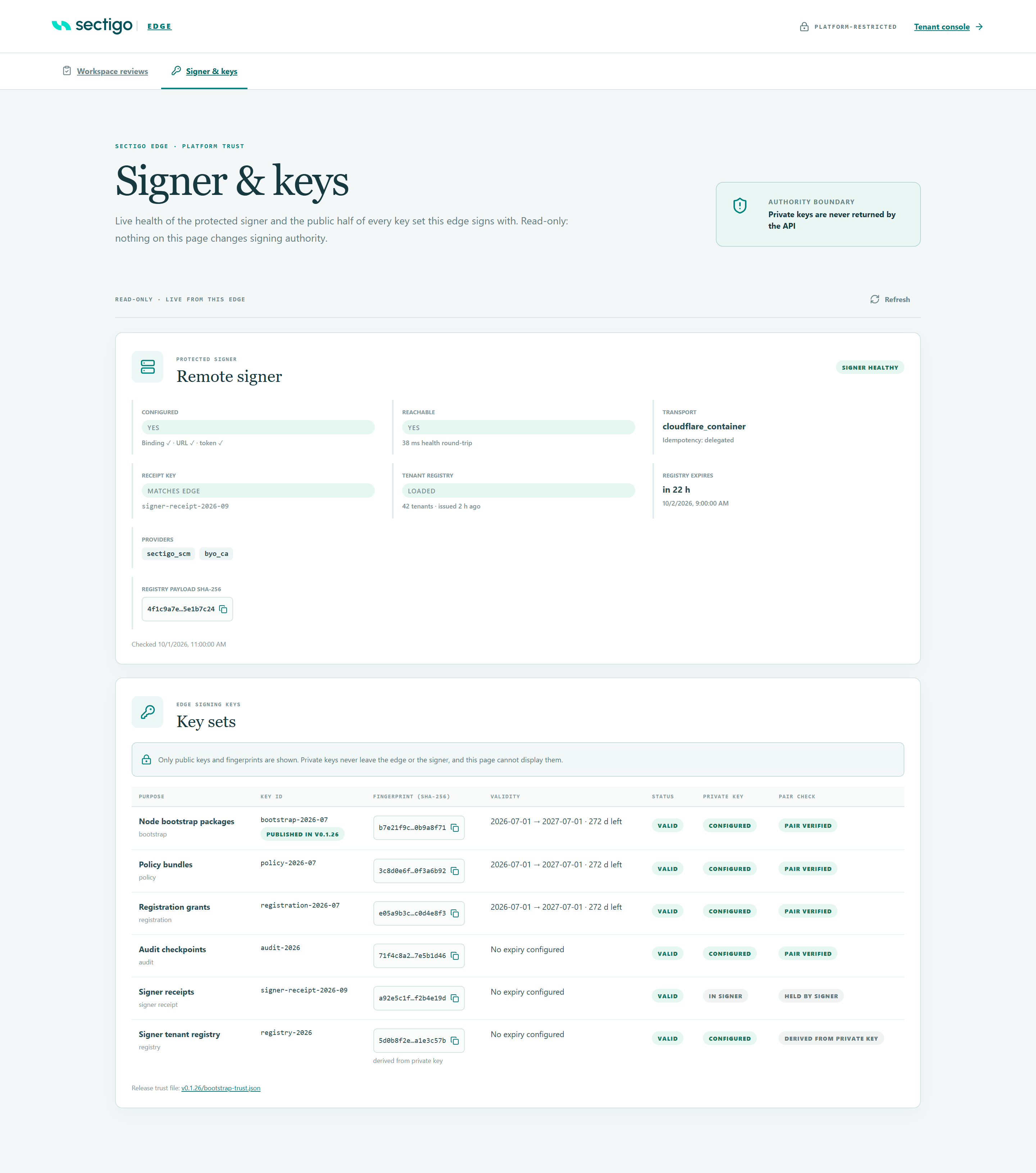
The Remote signer card
The pill at the top right of the card summarises the signer:
| Summary pill | Meaning |
|---|---|
| Signer healthy | Configured, reachable and no warnings. |
| Signer needs attention | One or more warnings (amber) but nothing critical. |
| Signer degraded | At least one critical warning (red). |
| Signer unreachable | The platform could not reach the signer. |
| Signer not configured | The connection to the signer is not set up. |
The card then lists:
| Field | What it tells you |
|---|---|
| Configured | Yes when the signer connection is fully configured. The ticks underneath show which parts (binding, URL, token) are present. |
| Reachable | Yes when the signer's health check answered, with the round-trip time in milliseconds, or No response. |
| Transport | How the platform connects to the signer, and the idempotency mode it reports. |
| Receipt key | Matches edge when the signer's receipt key ID is the one the platform expects; Mismatch otherwise; Not checked if the signer did not report one. |
| Tenant registry | Loaded or Not loaded, the number of tenants in it, and when it was issued. The signer only signs for tenants in this registry. |
| Registry expires | When the current tenant registry stops being accepted, as a relative time and a date. |
| Providers | The signing providers the signer reports. |
| Registry payload SHA-256 | Fingerprint of the loaded registry. Select it to copy the full value, for example to compare with your registry publication records. |
If the authenticated status call failed, the card ends with Status call failed: and the error returned.
Warnings and what to do
Warnings appear at the top of the card, critical ones first.
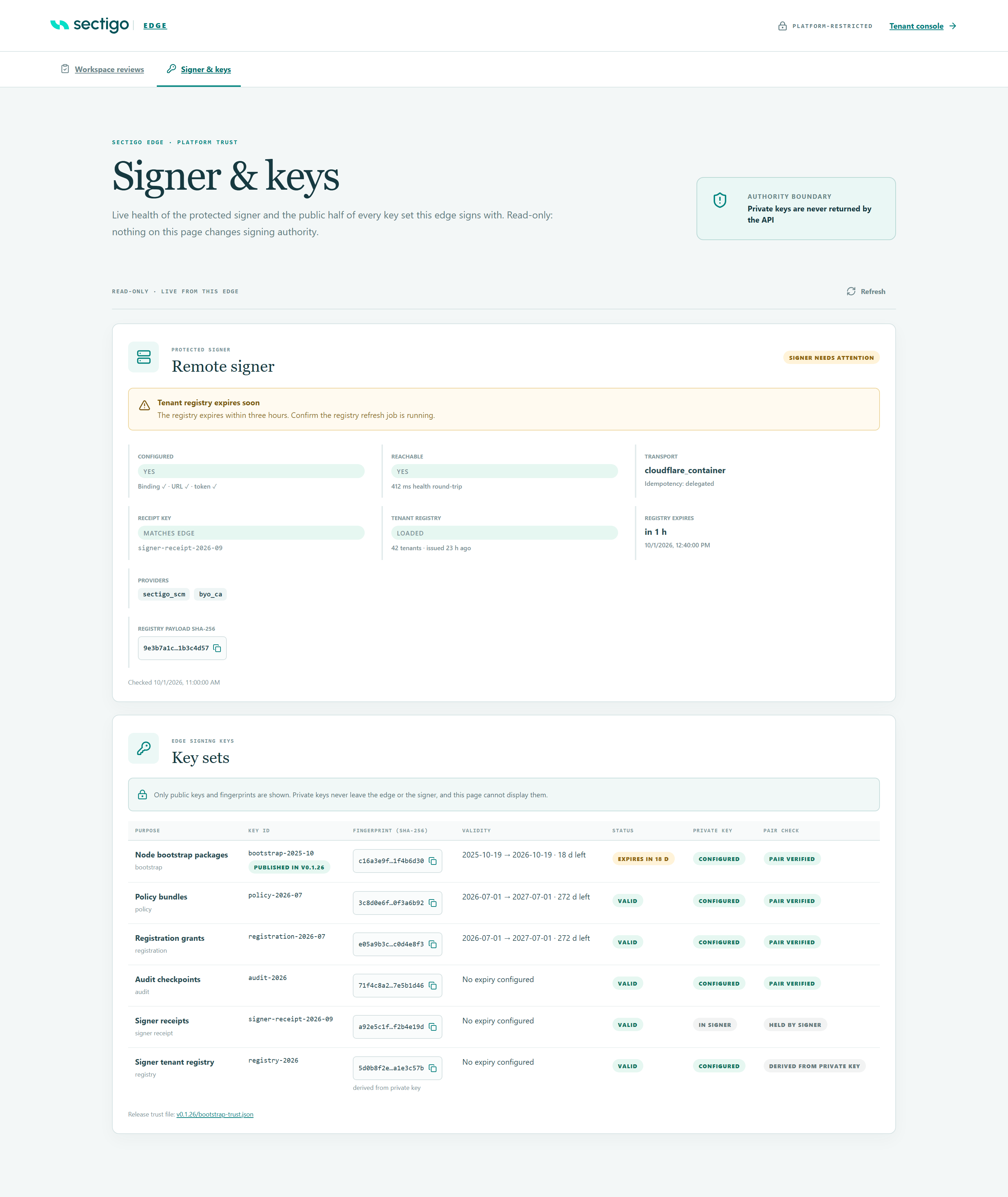
| Warning | Severity | Meaning | What to do |
|---|---|---|---|
| Signer is unreachable | Critical | The platform could not reach the signer's health endpoint. Issuance that needs the signer will fail. | Check that the signer service is running and that the network path from the platform is healthy, then select Refresh. |
| Tenant registry is not loaded | Critical | The signer has no verified tenant registry, so it refuses tenant-bound signing requests. | Publish a signed tenant registry to the signer. |
| Tenant registry has expired | Critical | The signer rejects requests against an expired registry. | Publish a freshly signed registry to the signer. |
| Signer receipt key does not match | Critical | The signer reports a different receipt key ID from the one the platform is configured to expect. The platform will reject the signer's receipts, so signing fails. | Align the platform's expected receipt key ID with the key the signer actually uses (typically after an incomplete receipt-key rotation). |
| Signer status is unavailable | Warning | The health check answered, but the authenticated status call failed. | Check the service token and that the signer version matches the platform. |
| Tenant registry expires soon | Warning | The registry expires within three hours. | Confirm the registry refresh job is running; publish a new registry if it is not. |
| Signer is not fully configured | Warning | Part of the signer connection (binding, URL or service token) is missing. The warning text names the missing setting. | Complete the signer connection configuration. |
The Key sets table
Under EDGE SIGNING KEYS → Key sets, one row per key purpose:
| Purpose | What it signs or verifies |
|---|---|
| Node bootstrap packages | Enrollment packages for new Mesh Nodes. |
| Policy bundles | Signed policy bundles. |
| Registration grants | Grants that approve service claims. |
| Audit checkpoints | Audit evidence checkpoints. |
| Signer receipts | Verifies receipts returned by the signer. Its private key is held by the signer, not the platform. |
| Signer tenant registry | The tenant registry delivered to the signer. |
Columns
| Column | Shows |
|---|---|
| Purpose | The key's label and purpose. |
| Key ID | The configured key ID. For Node bootstrap packages a release pill follows; see Published in release. |
| Fingerprint (SHA-256) | A shortened fingerprint of the public key. Select it to copy the full value. derived from private key appears when the public key was computed from the private key rather than configured separately. |
| Validity | For dated keys, not-before → expiry with days left or days since expiry. Undated keys show No expiry configured. |
| Status | A status pill (below), followed by any configuration problems. |
| Private key | Configured, Missing, or In signer (for keys held by the signer). |
| Pair check | Whether the public and private keys belong together (below). |
Status pills
| Pill | Meaning | What to do |
|---|---|---|
| Valid | Configured and inside its validity window. | Nothing. |
| Expires in N d / Expires today | Valid, but within 30 days of expiry. | Plan the rotation now. |
| Not yet valid | The not-before date is in the future, so the key is not usable yet. | Check the not-before date in the key configuration. |
| Expired | Past its expiry date. | Rotate the key immediately. |
| Incomplete | Part of the key configuration is missing or invalid. The problems are listed under the pill. | Fix each listed problem. |
| Not configured | Nothing is configured for this purpose. | Configure it if this deployment uses it. |
Problems that can appear under Incomplete: key id missing, public key missing, private key missing, not before missing, expires at missing, private key invalid, public key invalid. A key pair mismatch problem appears together with a Pair mismatch pill.
Pair check
For keys where both halves are available, the platform signs a fixed test message with the private key and verifies it with the public key.
| Pill | Meaning |
|---|---|
| Pair verified | The public and private keys belong together. |
| Pair mismatch | They do not match. Anything signed with this key will fail verification. Fix the configuration before relying on it. |
| Held by signer | The private key lives in the signer, so the pair cannot be checked here. |
| Derived from private key | The public key was computed from the private key, so they match by construction. |
| Not checked | The check could not run, usually because one half is missing. |
Published in release
The Node bootstrap packages key carries an extra pill that checks whether its key ID is listed in the trust file of the current node release (the bootstrap-trust.json linked at the bottom of the table as Release trust file). Mesh Nodes use that file to verify enrollment packages.
| Pill | Meaning | What to do |
|---|---|---|
| Published in vX.Y.Z | The release's trust file lists this key. | Nothing. |
| Missing from vX.Y.Z | The release's trust file does not list the key currently used to sign enrollment packages. Nodes installed from that release may not trust new enrollment packages. | Publish a release whose trust file includes this key, or align the signing key with the published one. |
| Release check unavailable | The trust file could not be fetched or read. | Select Refresh later; open the Release trust file link to check it manually. |
Rotating keys: what to watch
Key rotation is performed outside this screen. Use the screen before and after a rotation to confirm the result:
- Before: note the current Key ID, Fingerprint and Validity, so you can confirm the change afterwards.
- After: confirm the row shows the new key ID and fingerprint, a Valid status (not Not yet valid), and Pair verified (or Held by signer / Derived from private key as appropriate).
- For Node bootstrap packages, confirm the pill reads Published in the current release, so new node enrollments keep working.
- For Signer receipts, confirm the signer card shows Receipt key: Matches edge.
Troubleshooting
| Message | Cause | What to do |
|---|---|---|
| Your platform admin session has expired. Sign in again to continue. | Your platform sign-in has expired. | Select Re-authenticate and sign in again. |
| A Re-authenticate button appears next to another error | The platform requires a fresh sign-in. | Select Re-authenticate. |
| Platform status could not be loaded | The signer or key report could not be fetched. | Select Refresh. The other card may still load; each is fetched separately. |