Integrations
Integrations connect Sectigo Edge to the systems that request, use or issue your certificates. Almost all of them run on a Mesh Node inside your environment; only Sectigo SCM runs in the cloud. Every guide in this section follows the same shape: what the integration does, how to prepare the host, what to add to the node's config.json, how to configure it in the console, what your policy must allow, how rotation and rollback behave, and how to troubleshoot.
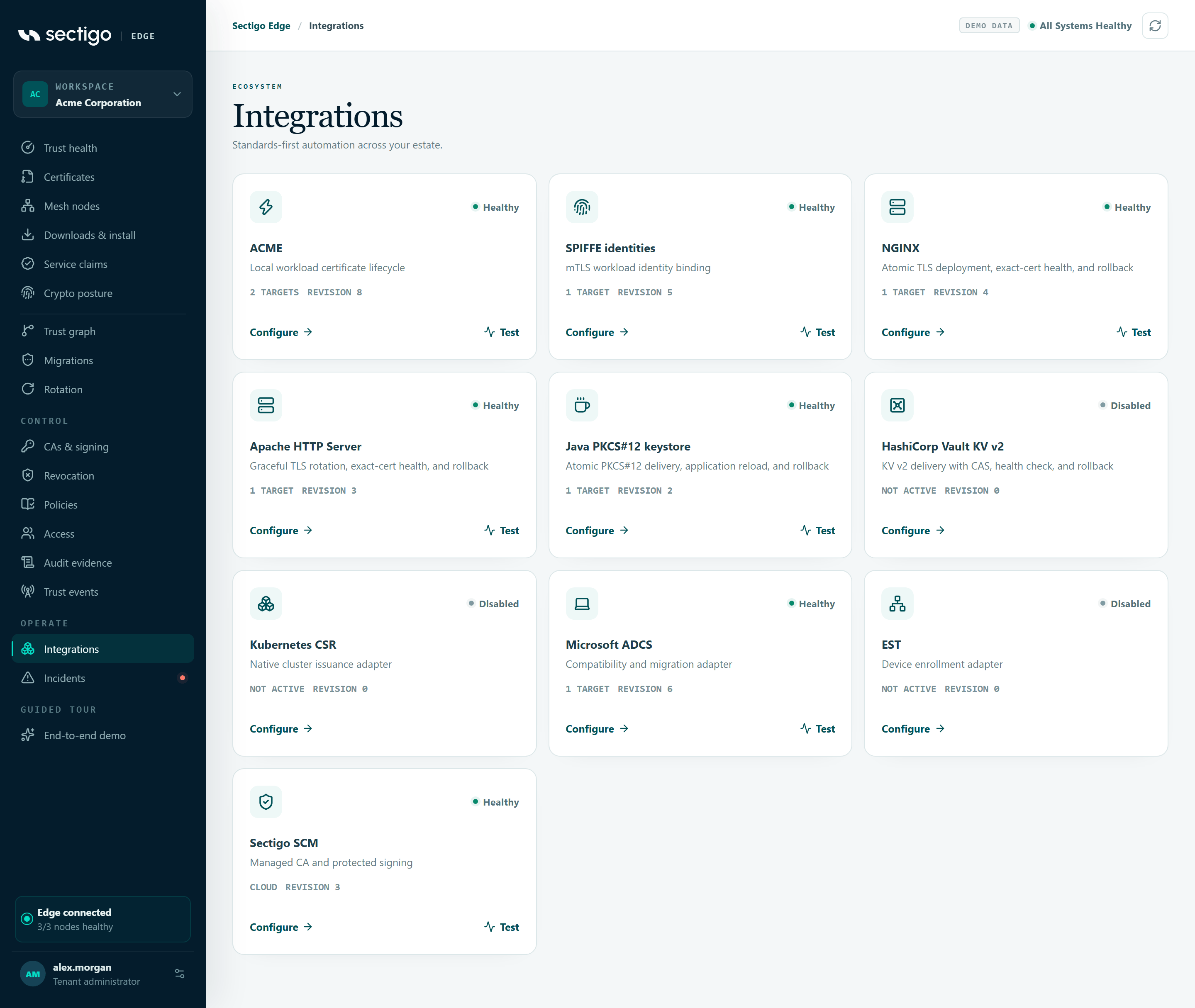
Choose an integration
| Integration | Console card | Runs on | What it does |
|---|---|---|---|
| ACME | ACME | Any node | Built-in RFC 8555 service for ACME clients, with node-bound External Account Binding |
| SPIFFE / SPIRE | SPIFFE identities | Linux / Kubernetes node beside SPIRE Server | Turns approved service claims into SPIRE registration entries |
| NGINX | NGINX | Linux node | Zero-downtime certificate rotation with exact-certificate health checks and automatic rollback |
| Apache HTTP Server | Apache HTTP Server | Linux node | Graceful-restart rotation with exact-certificate health checks and automatic rollback |
| Java (PKCS#12) | Java PKCS#12 keystore | Linux or Windows node | Password-protected PKCS#12 keystores, application reload, rollback |
| HashiCorp Vault | HashiCorp Vault KV v2 | Any node | Writes certificates and keys to Vault KV v2 with a check-and-set pointer |
| Kubernetes CSR | Kubernetes CSR | Kubernetes node | Custom signer for approved CertificateSigningRequest objects |
| Microsoft ADCS | Microsoft ADCS | Windows node | Issues through your existing enterprise CA and template under Sectigo Edge policy |
| EST | EST | Any node | RFC 7030 enrollment for devices and appliances |
| Sectigo Certificate Manager | Sectigo SCM | Cloud | Uses your SCM account as the issuing CA |
How every node-hosted integration works
Configuration is split deliberately between the console and the node:
| Lives in the console (desired state) | Lives on the node (config.json and local files) |
|---|---|
| Enabled or disabled | Paths, executables and their SHA-256 pins |
| Target Mesh Nodes | Passwords, tokens and private keys in private local files |
| Certificate / identity profile | Reload commands and timeouts |
A local adapter reference such as local/nginx-production | The same adapter reference and profile, which the node matches |
| For Sectigo SCM: the active SCM connector; for ADCS: the public ADCS CA chain | — |
The adapter reference is a name, not a credential. Secrets are never accepted by the console's integration schema.
Configure an integration in the console
- Prepare the node first: add the integration's keys to
config.json, validate it and restart the node. Each guide shows the exact keys. - Open ConsoleIntegrations and select Configure on the integration's card.
- Select Enable this integration.
- Under Target Mesh Nodes, select the node(s) that should run it (up to 32). NGINX and Apache only accept Linux or Linux-container nodes; incompatible nodes are disabled in the list.
- Enter the Certificate / identity profile (2–128 characters: letters, digits,
.,-,_). - Enter the Local adapter reference exactly as it appears in the node's
config.json. ACME and SPIFFE use the fixed built-in referencesbuiltin/acmeandbuiltin/spire. - Select Save desired state. You need the right permission (
can_manage_nodes, orcan_manage_cafor Sectigo SCM) and a fresh MFA session.
Saving advances the integration's revision. The assigned node picks it up on its next poll, checks it against its local configuration and reports back.
Statuses
| Card status | API value | Meaning |
|---|---|---|
| Disabled | disabled | Not enabled; no authority or workload path is active. |
| Awaiting node | pending_node | A new revision or test is waiting for every assigned node to acknowledge it. |
| Healthy | healthy | Every assigned node applied and checked the exact current revision. |
| Degraded | degraded | A node rejected the revision or cannot operate the adapter. The card shows the error code. |
Disabling an integration or removing a node from it sends that node an authority-withdrawal tombstone: the node immediately stops serving or activating that integration, even if it later loses its connection. Every save, test and acknowledgement is recorded in the tenant audit log.
Test
For an enabled integration, Test asks the assigned nodes to re-check the adapter end to end and report again. The card shows Awaiting node until they do. For Sectigo SCM, see what a test records.
Error codes reported by any node-hosted integration
| Code | Meaning | Fix |
|---|---|---|
adapter_not_installed | The node has no adapter for this kind | Use a node that supports it |
<kind>_not_configured (for example nginx_not_configured, est_not_configured, adcs_not_configured, spire_not_configured) | The node's config.json does not enable this adapter | Add the keys, validate and restart the node |
adapter_reference_invalid | The console's adapter reference differs from the node's | Make them identical |
profile_not_mapped | The console's profile differs from the node's *_profile_id | Make them identical |
profile_not_configured | No profile was selected in the console | Enter a profile |
integration_kind_unsupported | The node version does not know this integration | Upgrade the node |
Adapter-specific codes are listed on each integration page. To see them locally, run sectigo-edge … integrations or status on the node (CLI reference).
Policy requirements for activating adapters
Adapters that change what a service is serving (NGINX, Apache, Java PKCS#12 and HashiCorp Vault) are activating deployment boundaries. Your signed policy must allow them explicitly:
- the workload profile's allowed deployment modes must include the adapter's mode (
nginx,apache,java_keystoreorhashicorp_vault;microsoft_adcsfor ADCS issuance); - the profile needs an explicit rotation block with
mode: dual_slot, renewal lead time, overlap, health grace, a rollback window and a promotion mode ofautomatic_after_healthormanual.
Every issuance for these adapters binds the profile, adapter reference and current integration revision. Disabling, reassigning or changing the integration invalidates an in-flight deployment before it is activated. See Policies and Zero-downtime rotation.
In this section
ACME
Issuing and renewing certificates through Sectigo Edge with standard ACME clients.
SPIFFE / SPIRE
Using Sectigo Edge with SPIFFE workload identities and SPIRE deployments.
NGINX
Delivering and rotating certificates for NGINX with zero-downtime reloads.
Apache HTTP Server
Delivering and rotating certificates for Apache HTTP Server with graceful reloads.
Java (PKCS#12)
Delivering certificates to Java applications as PKCS#12 keystores and handling keystore passwords and reloads.
HashiCorp Vault
Connecting Sectigo Edge to HashiCorp Vault so certificates and keys are written to, or issued through, Vault.
Kubernetes CSR
Signing Kubernetes CertificateSigningRequests through Sectigo Edge.
Microsoft ADCS
Using Microsoft Active Directory Certificate Services as an issuing CA with Sectigo Edge.
EST
Enrolling devices and clients over Enrollment over Secure Transport (EST).
Sectigo Certificate Manager
Connecting Sectigo Certificate Manager (SCM) as a certificate authority for your workspace.