Policies
The Policies screen (page heading Cryptographic policy) shows the rules every certificate must satisfy and lets you change them safely. Policies are signed and versioned, and both trust domains evaluate them.
ConsolePoliciesWhat it's for
- See the effective rules: allowed algorithms, maximum lifetimes, node quorum, deployment paths and issuance guardrails.
- Configure the next policy version, including workload profiles.
- Assess what the change would do to your managed estate before submitting it.
- Activate a proposal. A different person must approve it.
How policies combine
Three layers are intersected for every issuance:
- SECTIGO PLATFORM: an immutable safety floor controlled by Sectigo, outside your administration.
- ENTERPRISE: your tenant policy: algorithms, lifetimes, quorum and transition plan.
- WORKLOAD: the exact profile selected by the request: SPIFFE identity, DNS namespace, adapter, evidence and rotation rules.
Most restrictive policy wins. A lower layer can narrow authority but never expand it. A request is denied unless every layer allows it.
What you see
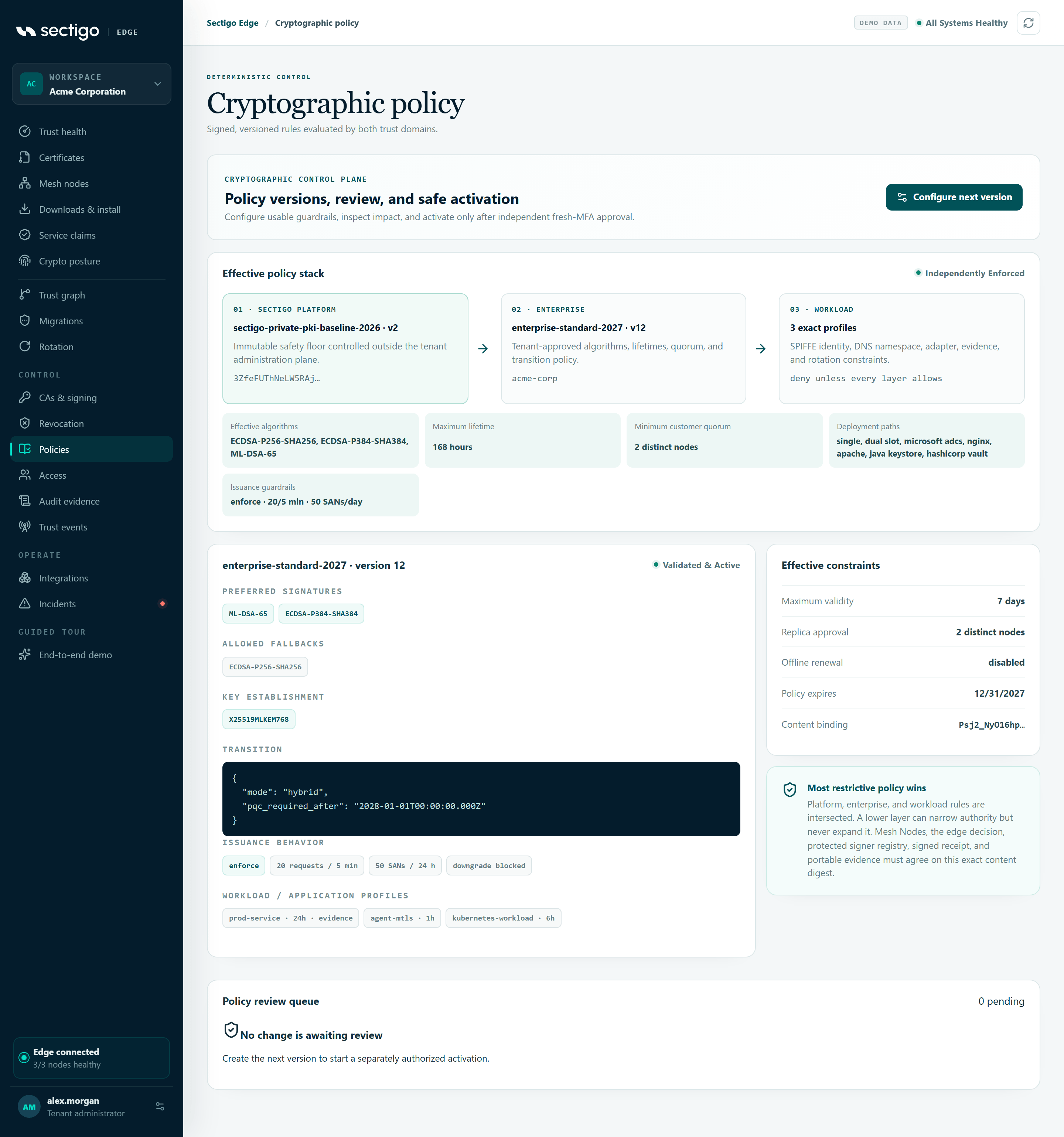
Effective policy stack
Shows the three layers and the combined result.
| Field | Meaning |
|---|---|
| Effective algorithms | Signature algorithms allowed by every layer. None — issuance blocked if no algorithm survives. |
| Maximum lifetime | Smallest lifetime ceiling, in hours. |
| Minimum customer quorum | Largest required number of distinct node approvals. |
| Deployment paths | Deployment modes allowed by both the platform and the profile. |
| Issuance guardrails | Effective mode, requests per 5 minutes and SANs per day. |
The status in the card header shows whether the Sectigo platform policy is in force:
| Status | Meaning |
|---|---|
| independently enforced | The platform policy is active and its digest is known. |
| platform policy unavailable | The platform policy could not be loaded. Issuance stays closed. |
platform policy … (for example retired) | The platform policy is not active. |
| platform policy expired | The platform policy has passed its expiry. |
Active policy
The card title is the policy ID and version, for example acme-production · version 7. The status is active, draft, retired, expired or not yet effective.
| Block | Content |
|---|---|
| PREFERRED SIGNATURES | First-choice signature algorithms. |
| ALLOWED FALLBACKS | Other allowed algorithms. |
| KEY ESTABLISHMENT | Preferred key-exchange methods. |
| TRANSITION | Transition mode and post-quantum deadline. |
| ISSUANCE BEHAVIOR | Guardrail mode (or Inherited from the platform), requests per 5 minutes, SANs per 24 hours, and whether algorithm downgrade is blocked or monitored. |
| WORKLOAD / APPLICATION PROFILES | Each profile with its maximum lifetime, and evidence if it requires capability evidence. No scoped profiles — issuance fails closed if there are none. |
Effective constraints
Maximum validity (days), Replica approval (distinct nodes), Offline renewal (bounded or disabled), Policy expires and Content binding (the start of the policy's SHA-256 digest; every component must agree on this exact digest).
Policy review queue
Lists proposals with the number pending. Each proposal shows its version, policy ID, who proposed it and when, its digest, its status (pending, approved or rejected) and an impact badge:
- Impact committed with x/y endpoints compatible, or
- Compatibility blocked.
The action button on a pending proposal tells you what is possible:
| Button | Meaning |
|---|---|
| Approve & activate | You can activate this proposal. |
| Different reviewer required | You proposed it. Someone else must approve. |
| Resolve compatibility blockers | The impact assessment is blocking. It cannot be activated. |
| Refresh impact required | The proposal has no impact assessment. The proposer must refresh it. |
| Refresh estate impact | Shown to the proposer. Re-opens the exact proposal so you can re-assess the current estate. |
| Use as rollback base | Shown on an earlier approved version. Opens the editor pre-filled from that version. |
If there are no proposals: No change is awaiting review.
Configure the next version
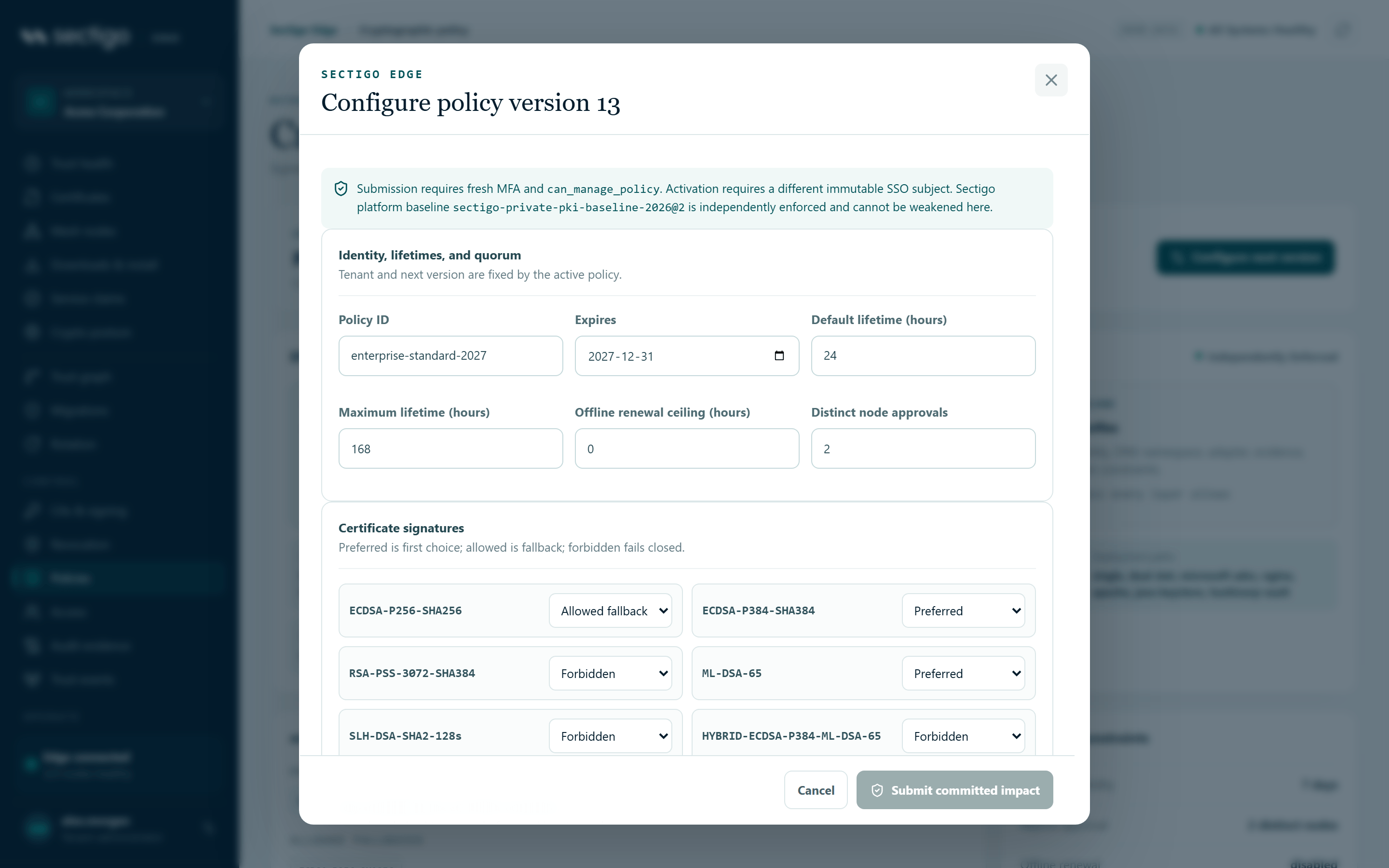
- Select Configure next version. The editor opens as Configure policy version N, where N is the active version plus one. The tenant and version are fixed.
- Edit the sections you need (see the field reference below).
- Under Activation impact, select Assess managed estate.
- Review the verdict, the counts and any endpoints listed as not compatible.
- Select I reviewed this exact assessment….
- Select Submit committed impact.
The console confirms: Proposal submitted. A different authorized SSO user must approve activation.
If you change the draft after assessing it, submission is rejected with The draft changed after assessment. Re-run estate impact before submission. Select Re-assess current draft and acknowledge again.
Identity, lifetimes, and quorum
| Field | Range |
|---|---|
| Policy ID | Text |
| Expires | Date. Defaults to the later of the current expiry and one year from now. |
| Default lifetime (hours) | 1–8,760 |
| Maximum lifetime (hours) | 1–8,760 |
| Offline renewal ceiling (hours) | 0–8,760. 0 disables offline renewal. |
| Distinct node approvals | 1–5. Never lower than the Sectigo platform minimum. |
Certificate signatures
Set each algorithm to Preferred, Allowed fallback or Forbidden. Preferred is first choice, allowed is a fallback, and forbidden fails closed.
ECDSA-P256-SHA256, ECDSA-P384-SHA384, RSA-PSS-3072-SHA384, ML-DSA-65, SLH-DSA-SHA2-128s, HYBRID-ECDSA-P384-ML-DSA-65.
Key establishment and PQC transition
| Field | Values |
|---|---|
X25519, X25519MLKEM768 | Preferred, Allowed fallback, Disabled |
| Transition mode | Classical, Hybrid migration, PQC required |
| PQC required after | Optional date |
Introduce hybrid transport before making it mandatory.
Issuance behavior guardrails
Detect or block abnormal requester velocity, namespace expansion, algorithm downgrade and lifetime escalation. Values start from your current policy, or from the Sectigo platform defaults if you have none.
| Field | Values |
|---|---|
| Response mode | Enforce · block matching requests or Monitor · issue with signed finding |
| Requests per requester / 5 min | 1–1,000 |
| Unique SANs per requester / 24 h | 1–10,000 |
| Maximum lifetime increase (%) | 0–1,000 |
| History lookback (days) | 1–90 |
| Algorithm downgrade | Checkbox: Signal a request weaker than the latest issued generation |
Matching requests in enforce mode are denied before any CA is called. Findings appear on Incidents.
Workload and application profiles
Each profile narrows who can request certificates and what they can get. Select Add profile to add one; it is named new-profile-1 (and so on) and starts from the scopes of your existing profiles. Remove is disabled when only one profile is left.
| Field | Meaning |
|---|---|
| Profile ID | The profile name requests refer to. Must be unique. |
| Maximum lifetime (hours) | Up to the policy's maximum lifetime. |
| Capability evidence | Require fresh endpoint evidence before issuance. |
| SPIFFE path prefixes | One per line (or comma-separated), for example spiffe://your-trust-domain/workloads/. |
| DNS suffixes | One per line (or comma-separated). Converted to lower case. |
| Algorithms | Which of the policy's allowed algorithms this profile may use. |
| Deployment paths | single, dual slot, microsoft adcs, nginx, apache, java keystore, hashicorp vault. Choosing a dual-slot-capable path switches the profile to dual-slot rotation. |
| Promotion | Operator verifies & promotes, or Automatic after exact health (only with NGINX, Apache, Java keystore or HashiCorp Vault). |
| Renew before (hours) | From 1 up to the profile's maximum lifetime. |
| Overlap (minutes) | 0–10,080 |
| Health grace (seconds) | 10–3,600 |
| Rollback window (minutes) | 1–1,440 |
Eligible approval nodes
Leave all nodes unchecked to let any enrolled node count toward the quorum, or check specific nodes to pin an explicit quorum set.
Activation impact
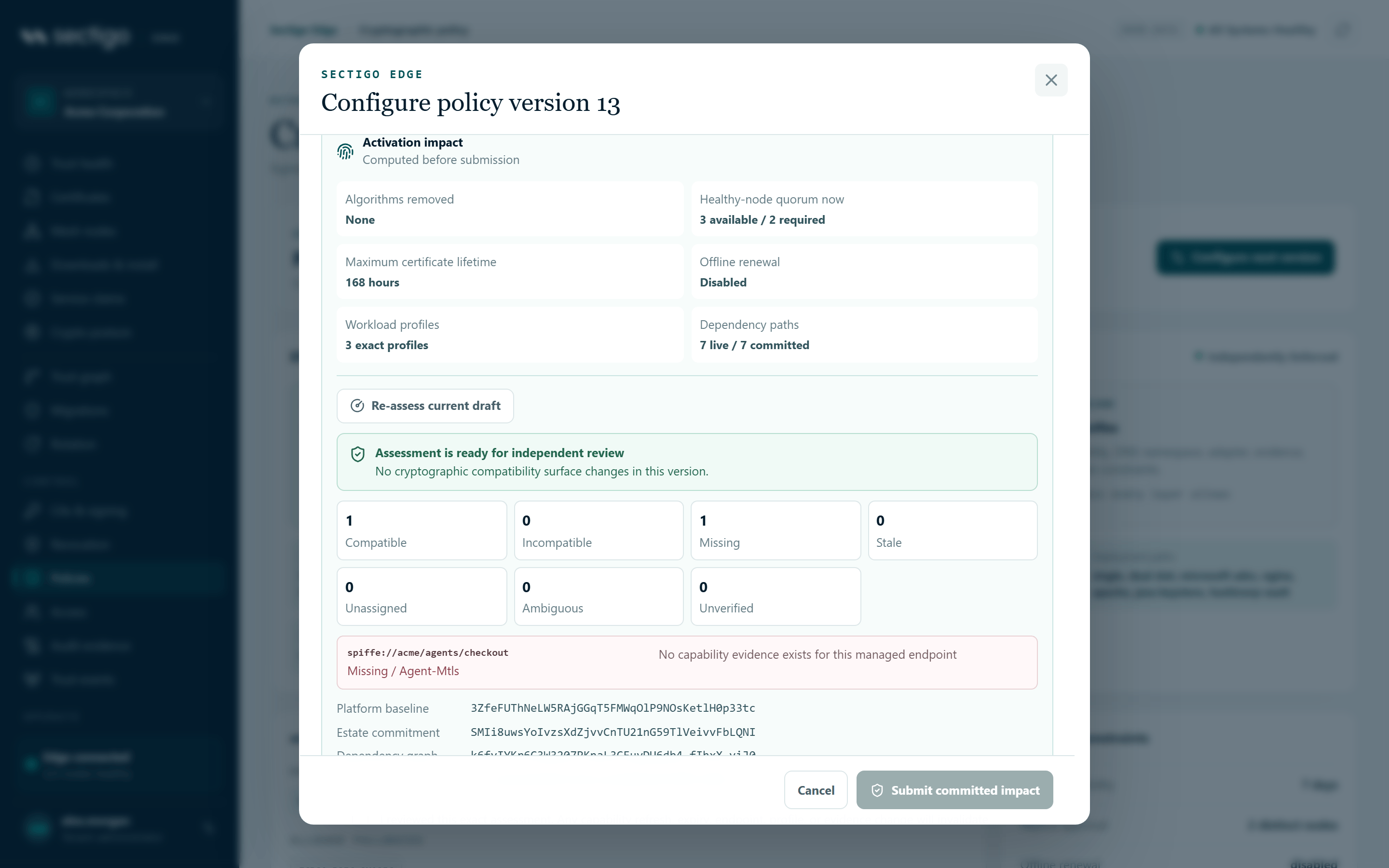
The quick summary, computed before you assess:
| Line | Meaning |
|---|---|
| Algorithms removed | Allowed algorithms this version drops, or None. |
| Healthy-node quorum now | x available / y required. Highlighted if too few nodes are healthy. You cannot submit until enough nodes are healthy. |
| Maximum certificate lifetime | In hours. |
| Offline renewal | Hours, or Disabled. |
| Workload profiles | Number of profiles. |
| Dependency paths | Live and committed edges after assessment. |
Assess managed estate computes a server-side snapshot from your certificate sets, in-flight issuance and latest capability evidence. The verdict reads Assessment is ready for independent review or Cryptographic activation is blocked, followed by whether cryptographic behavior changes in this version.
Each managed endpoint is classified:
| Class | Meaning |
|---|---|
compatible | Fresh evidence shows the endpoint supports what the platform, the proposed policy and exactly one profile allow. |
incompatible | No allowed signature or key-exchange overlap, or hybrid/PQC support is not measured. |
missing | The endpoint has no capability record. |
stale | Its newest evidence has expired. |
unassigned | No profile owns the endpoint's identity. |
ambiguous | More than one profile owns it. |
unverified | Its newest evidence was imported by an administrator, not observed by a machine. |
A change to signatures, key establishment, transition mode or workload profiles is blocked while any endpoint is not compatible, including when the estate is empty. Up to eight problem endpoints are listed with reasons; large estates note that details are bounded but the commitment covers every endpoint.
The assessment ends with four digests: Platform baseline, Estate commitment, Dependency graph and Impact commitment. If Platform baseline reads Not bound — refresh required, re-assess.
Finally, select the acknowledgement: I reviewed this exact assessment. Any capability refresh, expiry, endpoint, profile, or evidence change will invalidate approval.
Advanced JSON preview shows the full draft policy.
Approve and activate a proposal
- Sign in as a different person from the proposer.
- Open ConsolePolicies and find the proposal in Policy review queue.
- Check the impact badge reads Impact committed.
- Select Approve & activate.
The console confirms: Policy version N activated and queued for signed node distribution. The Policy version tile on Trust health updates.
Activation is rejected if anything changed since the assessment: a new endpoint, new or expired evidence, a dependency change, a profile mapping or the Sectigo platform baseline. The proposer must then select Refresh estate impact, re-assess and acknowledge again.
Roll back to an earlier version
There is no "revert" switch: a rollback is a new version that a second person activates, like any other change.
- In Policy review queue, find the earlier approved version and select Use as rollback base. The editor opens pre-filled with that version's content.
- Expand Advanced JSON preview and note the settings you want to restore. Then close the editor.
- Select Configure next version and re-enter those settings.
- Assess, acknowledge and submit as usual. A second person activates it.
In the current release, a draft opened with Use as rollback base is numbered from the older version rather than from the active one, so assessing it fails with Policy must preserve the tenant and advance exactly one version. Use it as a reference and submit the change from Configure next version.
Platform policy limits
The Sectigo platform baseline cannot be changed from the editor. The editor shows it as platform-id@version. Your policy can make it stricter but never weaker:
- You cannot allow an algorithm the platform forbids.
- Lifetimes and the offline renewal window cannot exceed the platform ceiling.
- Distinct node approvals cannot be lower than the platform minimum.
- Deployment paths must be allowed by the platform.
- Guardrails can only be tightened: enforce mode, lower ceilings, downgrade protection and longer lookback are stricter.
A draft that leaves no allowed signature, key-establishment method or deployment path is rejected before assessment.
Permissions
| Action | Roles |
|---|---|
| View the active policy and stack | Every role |
| View the review queue, assess impact | PKI Operator, Tenant Admin |
| Submit a proposal | PKI Operator, Tenant Admin. Requires MFA within the last ten minutes. |
| Approve & activate | PKI Operator, Tenant Admin, and a different person from the proposer. Requires MFA within the last ten minutes. |
See Policy changes & approvals for the operational process.
Troubleshooting
| Message or symptom | Cause and fix |
|---|---|
| Assess and acknowledge the exact estate impact before submission | Run the assessment and select the acknowledgement. |
| The draft changed after assessment. Re-run estate impact before submission. | Select Re-assess current draft, then acknowledge again. |
| Policy must preserve the tenant and advance exactly one version | The draft is not the next version of the active policy. Close the editor and select Configure next version again. |
| Workload profile … already exists | Choose a unique Profile ID. |
| Submit committed impact is greyed out | The assessment is not acknowledged, or fewer nodes are healthy than Distinct node approvals requires. |
| Policy proposals could not be loaded or a permission message above the stack | Your role cannot manage policy. You can still view the active policy. |
| Different reviewer required | You proposed this version. Ask another PKI Operator or Tenant Admin. |
| Resolve compatibility blockers | Fix the endpoints listed in the assessment (refresh evidence, assign profiles) or change the draft, then submit a new proposal. |