Trust graph
The Trust graph screen (page heading Trust dependency graph) maps which of your services call which, based on signed evidence. Use it to see the cryptographic blast radius of a change before you make it.
ConsoleTrust graphWhat it's for
- Pick a service or identity you are about to change, such as its certificate, key, trust bundle or policy.
- See every caller that depends on it, directly and through other services.
- Check how fresh and how strong the evidence behind each connection is.
What you see
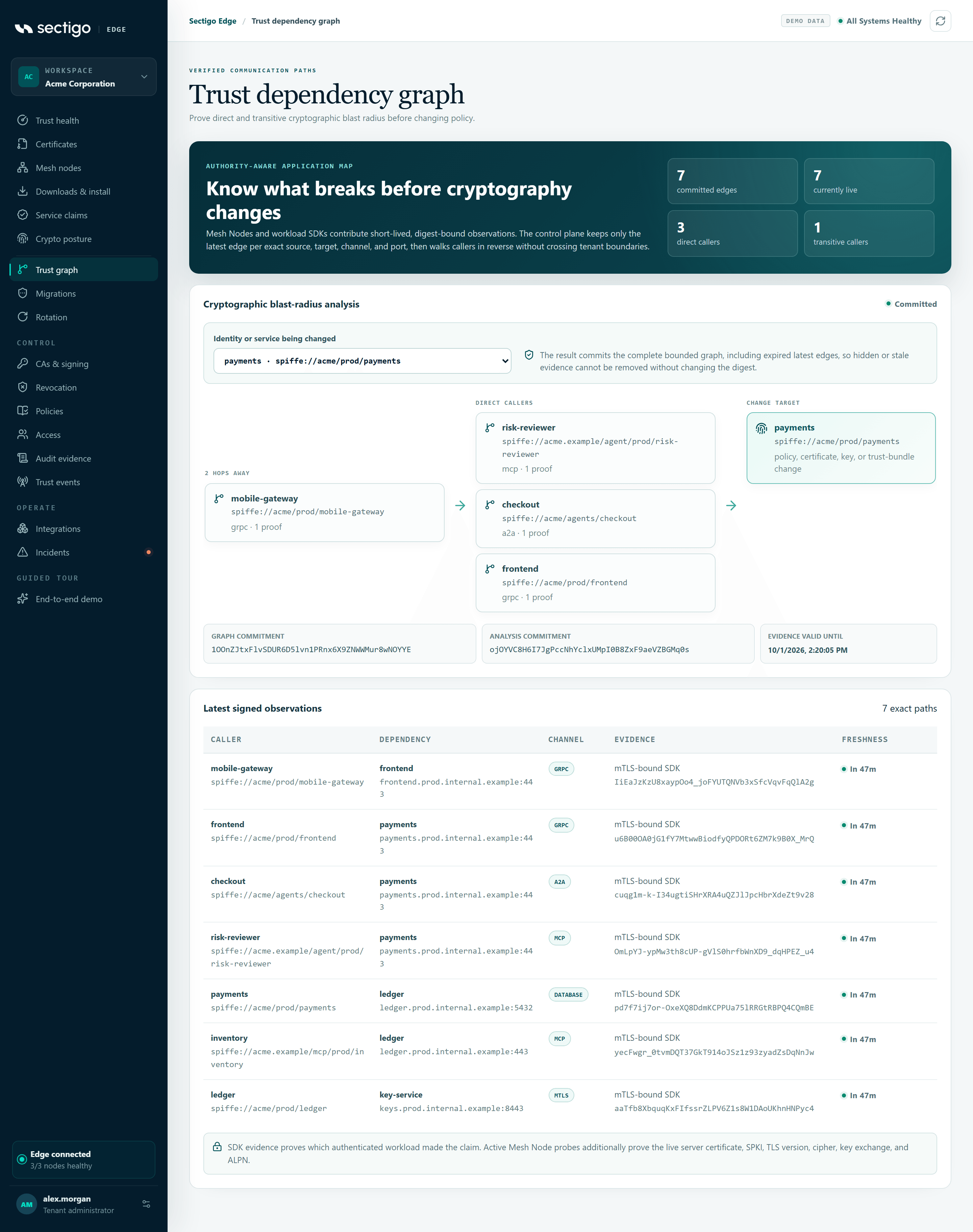
Summary
The banner, Know what breaks before cryptography changes, has four counters:
| Counter | Meaning |
|---|---|
| committed edges | Connections recorded in the graph. Only the latest observation for each exact caller, target, channel and port is kept. |
| currently live | Connections whose evidence has not expired. |
| direct callers | Services that call the selected target directly. |
| transitive callers | Services that reach the target through one or more other services. |
Cryptographic blast-radius analysis
- Under Identity or service being changed, choose the target. Each option shows a short name and its full identity.
- Wait for the status in the card header to change from
analyzingtocommitted. - Read the diagram from left to right: the furthest callers (n HOPS AWAY) on the left, then DIRECT CALLERS, then the CHANGE TARGET.
Each caller shows its identity, the channels it uses and how many proofs support it.
Under the diagram:
| Field | Meaning |
|---|---|
| Graph commitment | A digest of the complete graph used for the analysis, including expired latest edges, so evidence cannot be removed without the digest changing. |
| Analysis commitment | A digest of this specific result. |
| Evidence valid until | When the earliest supporting evidence expires, or No live path. |
No callers is not proof of isolation
If the analysis shows No live callers observed, that does not prove nothing depends on the target. Require fresh evidence coverage in policy before treating a target as isolated.
Latest signed observations
A table of every recorded connection, with the total shown as n exact paths.
| Column | Content |
|---|---|
| Caller | The calling service. |
| Dependency | The service called, with its DNS name (or identity) and port. |
| Channel | The protocol channel. |
| Evidence | How the connection was observed, plus the evidence digest. |
| Freshness | Time until the evidence expires, or expired. |
Evidence types:
| Evidence | What it proves |
|---|---|
| Verified TLS probe | A Mesh Node actively connected and verified the live server certificate, public key, TLS version, cipher, key exchange and ALPN. |
| Node observation | A Mesh Node passively observed the connection. |
| mTLS-bound SDK | A workload using the SDK reported the connection over its authenticated identity. This proves which workload made the claim. |
Common tasks
Check the impact of rotating a service's certificate
- Open ConsoleTrust graph.
- Select the service under Identity or service being changed.
- Review every caller in the diagram and confirm each one can accept the new certificate's algorithm. Use Crypto posture for capability evidence.
- Note the Evidence valid until time. Plan the change before the evidence expires, or let nodes refresh it.
Permissions
Every role can view the graph and run a blast-radius analysis.
Troubleshooting
| Symptom | Cause and fix |
|---|---|
The status shows failed with an error | The analysis could not run. The message comes from the service. Select Refresh in the top bar and try again. |
| The target list is empty | No dependency observations have been recorded. Mesh Nodes and SDKs must report connections first. |
Many rows show expired | Observations have not been refreshed. Check that the nodes reporting them are healthy. |