Incidents & break-glass
The Incidents screen lets you contain issuance risk without interrupting existing identities. Its main control is the issuance kill switch: one authorized person can pause all new issuance immediately, but resuming always takes two different people.
ConsoleIncidentsWhat it's for
- Pause new issuance during an incident, such as a suspected key compromise.
- Request and independently approve a resume once the incident is contained.
- Review issuance guardrail findings: unusual requests that were flagged or blocked.
When the kill switch is active or a resume request is waiting, the Incidents item in the navigation shows a red dot and the top bar reads issuance paused.
What you see
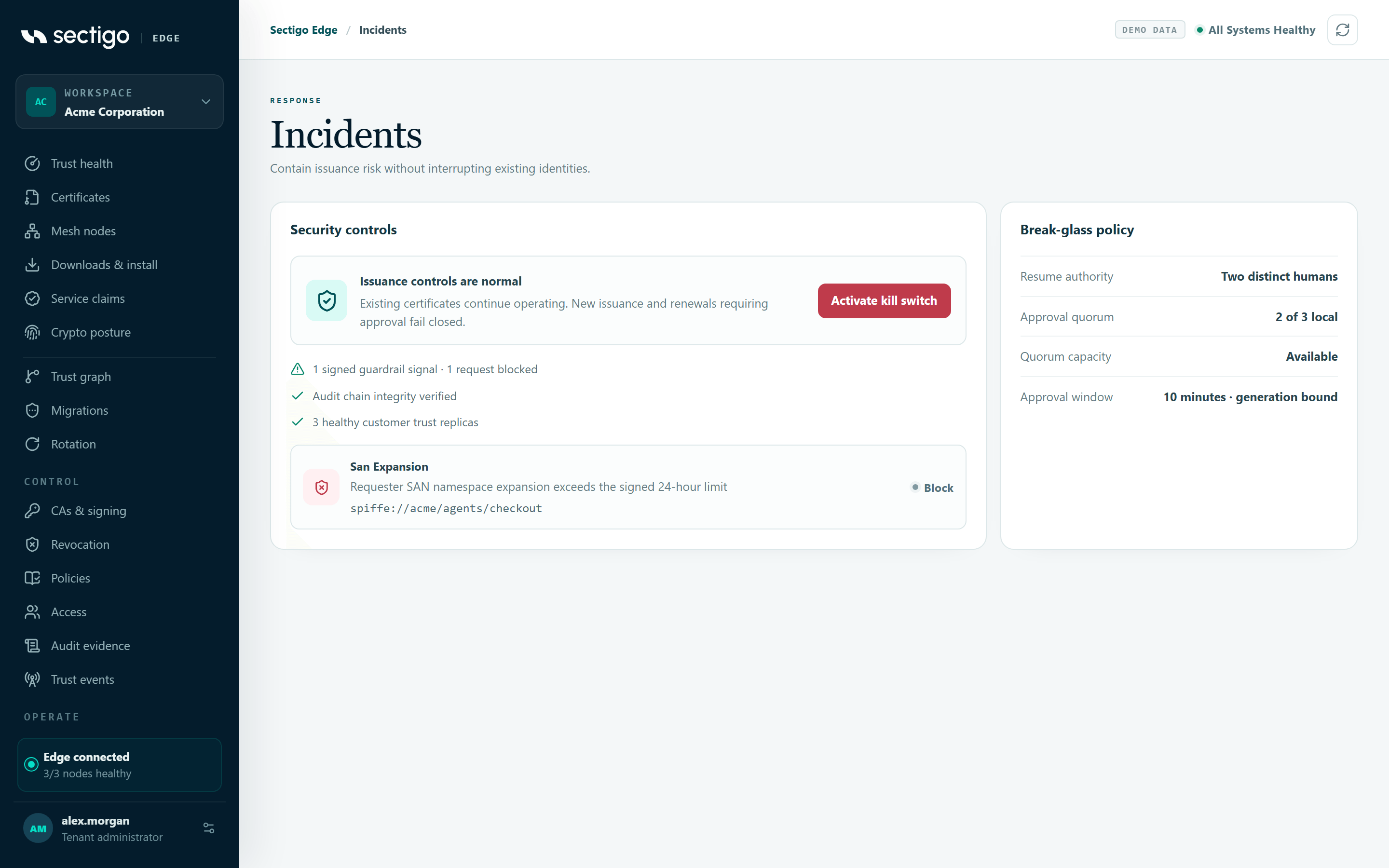
Security controls
| State | Heading | Button |
|---|---|---|
| Normal | Issuance controls are normal | Activate kill switch |
| Paused, no request | New issuance is paused | Request guarded resume |
| Paused, you made the pending request | New issuance is paused | Awaiting another operator (disabled) |
| Paused, someone else made the request | New issuance is paused | Independently approve resume |
Existing certificates continue operating. New issuance and renewals requiring approval fail closed.
While a resume request is pending, a panel shows RESUME REQUEST · GENERATION n, its status, the reason, who requested it and when it expires.
| Request status | Meaning |
|---|---|
| 1 of 2 approvals | Waiting for a second person. |
expired | Ten minutes passed without approval. The request can no longer be approved. |
Status lines
| Line | Meaning |
|---|---|
| No issuance-risk assessment has been recorded yet | No guardrail assessments exist yet. |
| n signed issuance assessments · no guardrail signal | Requests were assessed and none raised a signal. |
| n signed guardrail signals · m requests blocked | Some requests raised signals; m were blocked. Details are listed below. |
| Audit integrity label | Same labels as Audit evidence, for example Chain verified from genesis. |
| n healthy customer trust replicas | Healthy Mesh Nodes available for the approval quorum. |
Guardrail findings
Up to six findings are listed, each with the signal type, an explanation, the requester's identity and the decision. A block decision means the request was denied before any CA was called. Configure guardrails in Policies under Issuance behavior guardrails.
Break-glass policy
| Field | Value |
|---|---|
| Resume authority | Two distinct humans |
| Approval quorum | Required of eligible local nodes, for example 2 of 3 local |
| Quorum capacity | Available or Fail closed |
| Approval window | 10 minutes · generation bound |
Pause new issuance (kill switch)
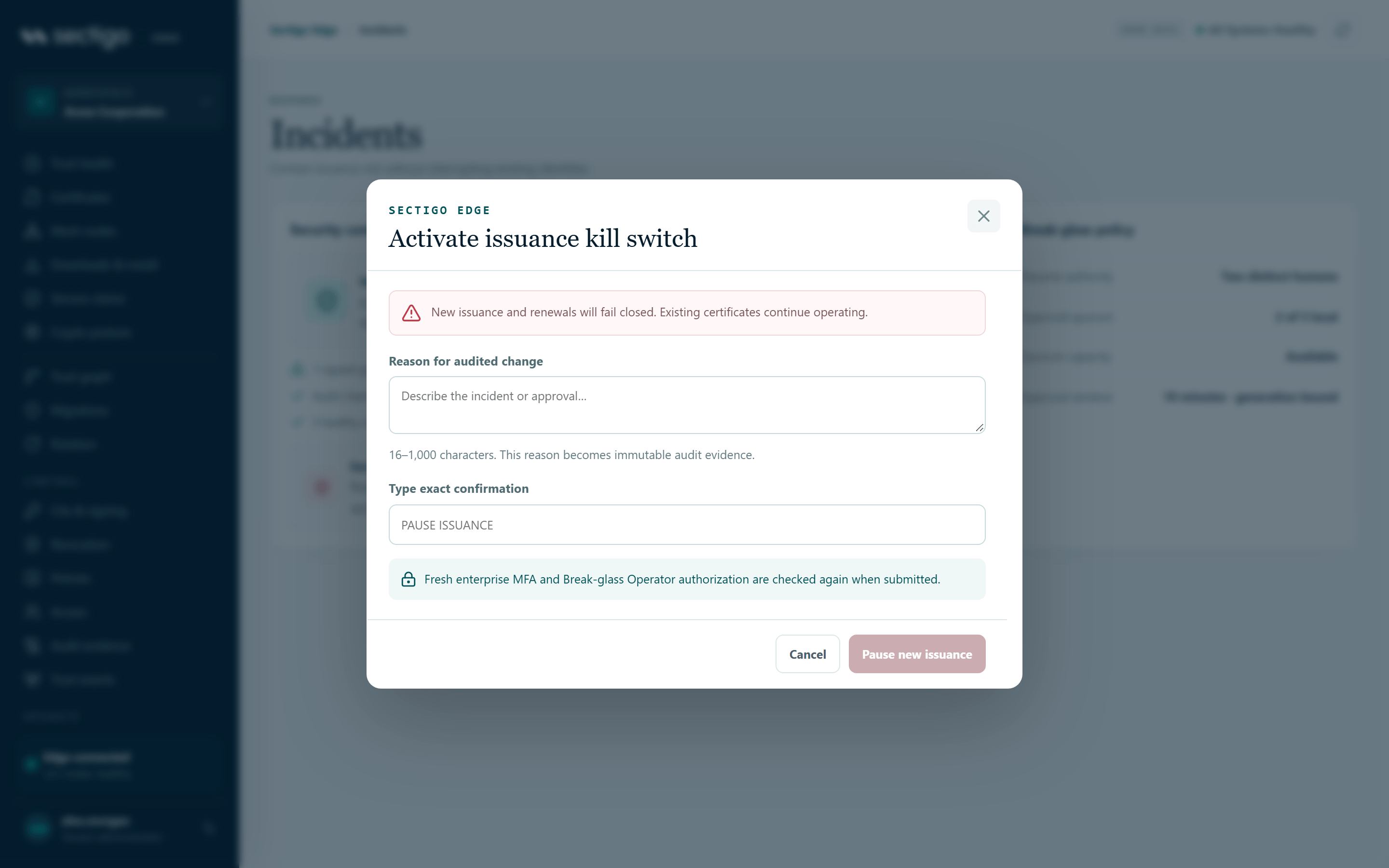
- Open ConsoleIncidents and select Activate kill switch, or select Emergency controls on Trust health.
- In Activate issuance kill switch, enter the Reason for audited change (16 to 1,000 characters). It becomes immutable audit evidence.
- In Type exact confirmation, type
PAUSE ISSUANCE. - Select Pause new issuance.
The console confirms: New issuance paused; existing certificates remain active.
Resume issuance
Resuming needs two different people, each with fresh MFA.
Step 1: request a resume
- Select Request guarded resume (or Resume issuance on Trust health).
- In Request guarded issuance resume, enter the reviewed recovery reason (16 to 1,000 characters).
- Type
REQUEST ISSUANCE RESUME. - Select Request independent approval.
The console confirms: Guarded resume requested; a different operator must approve. The request expires after ten minutes.
Step 2: approve the resume (second person)
- A different person signs in and opens ConsoleIncidents.
- They select Independently approve resume.
- In Independently approve issuance resume, they review REQUESTED BY and the reason.
- They type
APPROVE ISSUANCE RESUME. - They select Approve and resume issuance.
The console confirms: Independent approval recorded; issuance resumed.
You are the second human control. Self-approval, stale MFA, expired requests and requests from an earlier pause generation are rejected. A new pause cancels every pending resume request.
Confirmation phrases
| Action | Type exactly |
|---|---|
| Pause | PAUSE ISSUANCE |
| Request resume | REQUEST ISSUANCE RESUME |
| Approve resume | APPROVE ISSUANCE RESUME |
Phrases are case-sensitive. The submit button stays disabled until the phrase matches and, for pause and request, the reason is at least 16 characters.
In the demo, the requester can select Simulate second approval to see the full flow.
Permissions
| Action | Roles |
|---|---|
| View Incidents | Every role |
| Pause, request resume, approve resume | Break-glass Operator, Tenant Admin. Requires MFA within the last ten minutes, checked again on submit. |
| Approve resume | Must be a different person from the requester. |
Pre-assign at least two separately controlled people or groups to the Break-glass Operator role so that you are never blocked by having only one. See Access & roles and Incident response.
Troubleshooting
| Symptom | Cause and fix |
|---|---|
| The submit button is greyed out | The confirmation phrase does not match exactly, or the reason is shorter than 16 characters. |
| Awaiting another operator | You made the request. A different person must approve it. |
The request shows expired | Ten minutes passed. Select Refresh in the top bar; once the expired request clears, Request guarded resume is available again. |
| Approval is rejected | Your MFA is older than ten minutes, you are the requester, the request expired, or a newer pause replaced it. |
| Quorum capacity shows Fail closed | Not enough healthy Mesh Nodes. Even after resume, new issuance fails until quorum returns. See Mesh nodes. |