Overview & trust health
Trust health is the console's home screen. It answers one question at a glance: can your workspace safely issue certificates right now, and is the record of what happened intact?
ConsoleTrust healthWhat it's for
Sectigo Edge issues a certificate only when two independent trust domains approve the same transaction: Sectigo, and your own Mesh Nodes. Trust health shows the state of both sides, your certificate estate, your post-quantum readiness and whether the audit chain verifies.
What you see
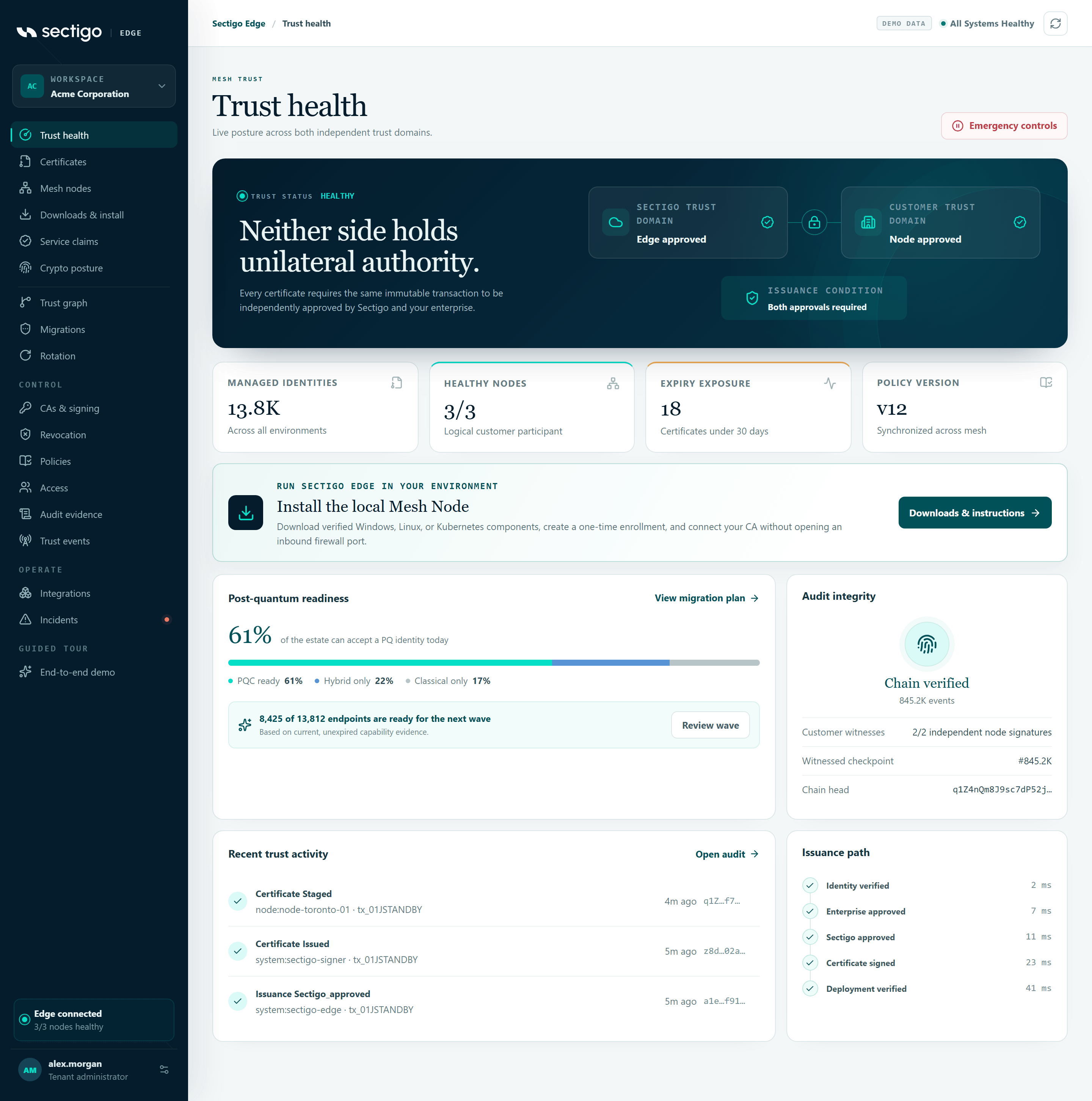
From top to bottom:
- Trust status banner with the dual-control trust diagram.
- Four metric tiles: Managed identities, Healthy nodes, Expiry exposure, Policy version.
- Install the local Mesh Node call-out with a Downloads & instructions button.
- Post-quantum readiness and Audit integrity cards.
- Recent trust activity and Latest issuance path cards.
The page header also has an Emergency controls button (it reads Resume issuance while issuance is paused). It opens the same kill-switch dialog described in Incidents & break-glass.
Trust status and the trust diagram
The banner shows TRUST STATUS followed by one of healthy, degraded or issuance paused.
The diagram has three boxes:
| Box | What it shows in your workspace |
|---|---|
| SECTIGO TRUST DOMAIN | Co-signs each transaction normally, or Issuance paused (with a warning icon) when the kill switch is active. |
| CUSTOMER TRUST DOMAIN | No Mesh Node enrolled, Quorum ready · h/r healthy, or Quorum unavailable · h/r healthy, where h is the number of healthy eligible nodes and r is the number of node approvals your policy requires. |
| ISSUANCE CONDITION | Always Both approvals required. |
The demo workspace shows fixed sample text (Edge approved and Node approved). Your workspace always shows its real quorum and pause state.
Metric tiles
| Tile | Value | Detail line in your workspace |
|---|---|---|
| Managed identities | Number of certificates | Certificates issued through Sectigo Edge |
| Healthy nodes | Healthy / enrolled nodes, for example 2/3 | All enrolled nodes reporting healthy, n node(s) not healthy, or No Mesh Nodes enrolled (shown as 0/0) |
| Expiry exposure | Number of active certificates expiring soon | Active certificates expiring within 30 days. Revoked, retired and already-expired certificates are not counted. |
| Policy version | v plus the active policy version | Active tenant policy |
A tile is highlighted as a warning when nodes are unhealthy or missing, or when any certificate is inside the 30-day window.
Post-quantum readiness
Shows the percentage of your estate that can accept a post-quantum identity today, with a bar split into PQC ready, Hybrid only and Classical only.
Below the bar, a call-out summarizes the next migration wave:
- No endpoint capability evidence yet: Mesh Nodes report what each endpoint supports once they are enrolled.
- x of y endpoints are ready for the next wave: based on current, unexpired capability evidence.
View migration plan and Review wave both open Crypto posture.
Audit integrity
Your browser re-hashes the audit events it loaded and checks that each event links to the one before it and that the newest event matches the reported chain head. The card shows the result:
| Label | Meaning |
|---|---|
| Verifying audit chain… | The check is still running in your browser. |
| No audit events yet | Nothing has been recorded yet. The chain starts with the first recorded action. |
| Chain verified from genesis | Every event from the first one onward was re-hashed and links correctly. |
| Recent events verified | The loaded window (events #from–#to) verifies. Older events are covered by exported proofs. |
| Audit chain could not be verified | An event does not match its recorded hash or predecessor link, or the loaded events do not end at the reported chain head. |
The card also lists:
- Customer witnesses: how many independent node signatures were received out of the number required.
- Witnessed checkpoint: the latest checkpoint number, or Awaiting first checkpoint.
- Chain head: the first characters of the newest event hash.
See Audit evidence for the full chain and proof export.
Recent trust activity
The four most recent audit events, each with its event type, the actor, the transaction ID where there is one, how long ago it happened and a short hash. Open audit takes you to Audit evidence.
Latest issuance path
Traces the most recent certificate transaction step by step. No step is shown as done without evidence.
| Step | Done when | Failed when |
|---|---|---|
| Request received | Always shown as done for the latest transaction. | — |
| Enterprise approved (x/y) | Your Mesh Nodes allowed the request and the node quorum was met. | A node denied the request. |
| Sectigo approved | Sectigo's decision allowed the request. | Sectigo denied the request. |
| Certificate signed | A certificate serial or certificate was returned. | The transaction was denied or expired. |
| Deployment healthy | The issued certificate is the active certificate of a certificate set and reports healthy. Only shown once the certificate is deployed. | The deployed certificate reports unhealthy. |
Steps that are neither done nor failed show a clock icon. Completed steps show how long ago they happened.
If you have never requested a certificate, the card says: No certificate request has been made yet. Each step appears here from the latest real transaction.
Common tasks
Check whether issuance is safe
- Open ConsoleTrust health.
- Confirm TRUST STATUS reads
healthyand the customer box reads Quorum ready. - Check that Healthy nodes shows every enrolled node as healthy.
- Confirm Audit integrity shows Chain verified from genesis or Recent events verified.
Find certificates that are about to expire
- Note the Expiry exposure count on Trust health.
- Open Certificates and review the Expiry column.
- For dual-slot certificates, stage and promote a replacement from Rotation.
Install your first Mesh Node
Select Downloads & instructions in the Install the local Mesh Node call-out. See Downloads & install.
Permissions
Every role that can view the workspace can see Trust health. The Emergency controls button opens a dialog whose actions need the Break-glass Operator or Tenant Admin role. See Access & roles.
Troubleshooting
| You see | What to do |
|---|---|
| Verifying both trust domains… for a long time | The console is still loading. Wait, then select Refresh in the top bar. |
| Console unavailable with Try again | The console could not load workspace data. The message under the heading comes from the service. Select Try again. If it persists, check your role assignment with a Tenant Admin. |
| You are sent to the sign-in page | Your session expired. Sign in again; you return to the same screen. |
| Quorum unavailable | Fewer healthy eligible nodes than your policy requires. Check Mesh nodes. New issuance fails closed until quorum returns. |
| Audit chain could not be verified | Select Refresh. If it remains, export a proof from Audit evidence and contact Sectigo support. |