Audit evidence
The Audit evidence screen shows the tamper-evident record of everything that happened in your workspace. It is held by both Sectigo and your own Mesh Nodes, and you can export a portable proof that an auditor can verify independently.
ConsoleAudit evidenceWhat it's for
- Review recent events: who did what, and to which transaction.
- Confirm that the event chain has not been altered.
- See whether your Mesh Nodes have witnessed the latest checkpoint.
- Export a portable proof for a transaction.
What you see
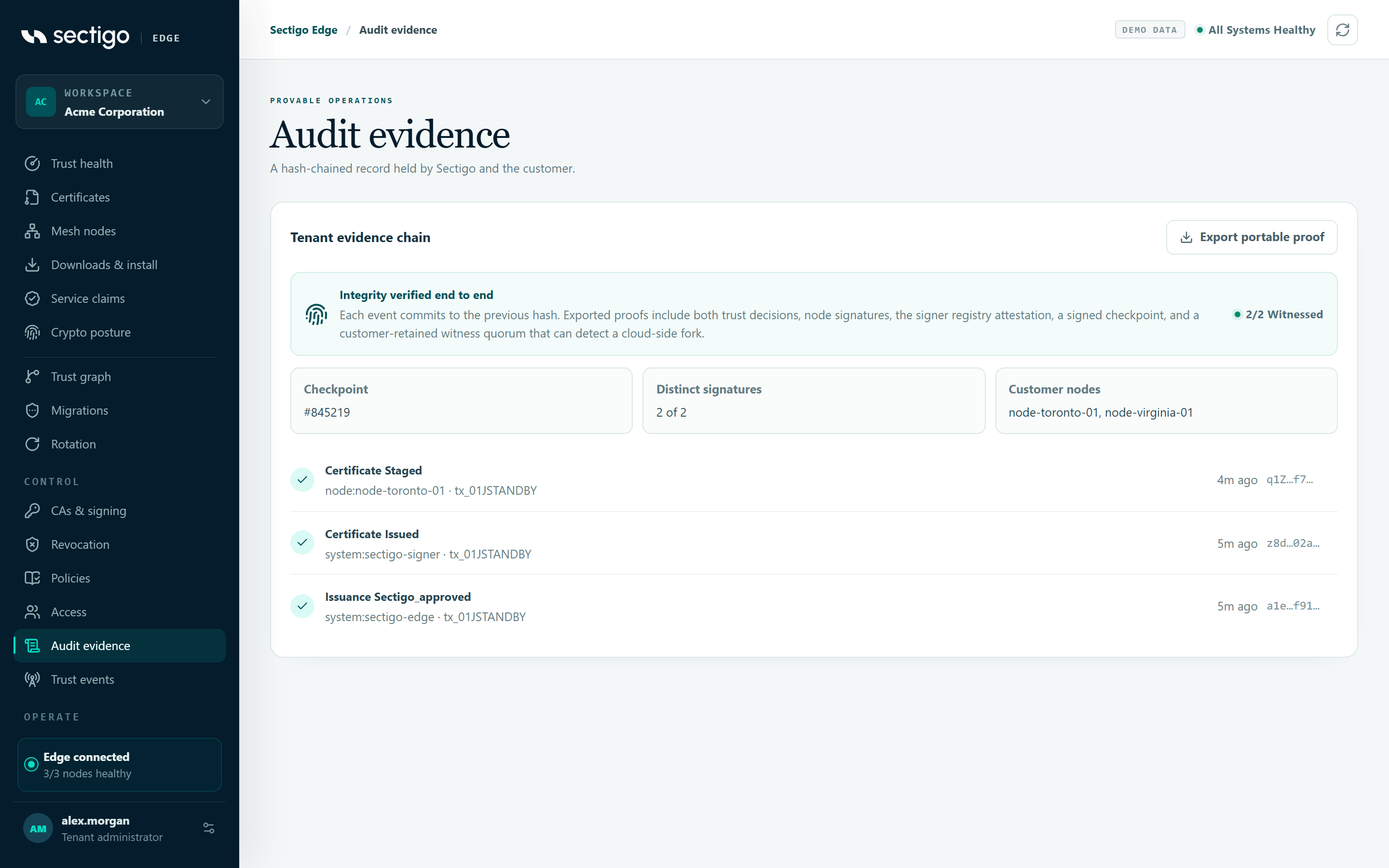
The card is titled Tenant evidence chain and has an Export portable proof button.
Integrity banner
Each event commits to the previous event's hash. Your browser re-hashes the events it loaded and checks every link. The banner shows the result:
| Label | Meaning | What to do |
|---|---|---|
| Verifying audit chain… | Re-hashing the loaded events in this browser. | Wait a moment. |
| No audit events yet | The chain starts with the first recorded action. | Nothing. |
| Chain verified from genesis | All loaded events, starting from the very first, re-hash correctly and link to each other. | Nothing. |
| Recent events verified | Events #from–#to re-hash correctly in this browser. Older events are covered by exported proofs. | Nothing. Export a proof if you need to cover older events. |
| Audit chain could not be verified | Either an event does not match its recorded hash or predecessor link, or the loaded events do not end at the reported chain head. | Select Refresh. If it remains, export a proof and contact Sectigo support. |
In the demo workspace the banner always reads Integrity verified end to end.
Witness status
Your Mesh Nodes independently sign audit checkpoints so that a fork on the cloud side can be detected. The status pill in the banner shows:
| Status | Meaning |
|---|---|
| x/y witnessed | The required number of node signatures was received for the latest checkpoint. |
pending | Waiting for enough node signatures. |
not configured | Witnessing is not set up. |
Below the banner:
| Field | Content |
|---|---|
| Checkpoint | The latest witnessed checkpoint number, or Not anchored. |
| Distinct signatures | Signatures received out of those required. |
| Customer nodes | IDs of the nodes that signed, or Waiting for an eligible Mesh Node. |
Event list
Each event shows its type (for example policy activated), the actor, the transaction ID where relevant, how long ago it happened and the start of its hash.
Export a portable proof
A portable proof is a JSON bundle that lets an auditor verify a transaction outside Sectigo Edge. It includes both trust decisions, the node signatures, the signer registry attestation, a signed checkpoint and a witness quorum from your Mesh Nodes.
- Open ConsoleAudit evidence.
- Select Export portable proof.
- Save the downloaded JSON file.
The console confirms Portable verification bundle downloaded.
The button exports the proof for the transaction of the first event in the list that refers to a transaction. You cannot choose a different transaction from this screen. The button is disabled when no loaded event refers to a transaction.
Export completes only after your Mesh Nodes have witnessed a checkpoint that covers the transaction. If not enough nodes have witnessed it yet, export fails; wait and try again.
The auditor verifies the bundle offline against keys from your own trust ceremony. See Audit evidence export.
In the demo workspace, the file is named sectigo-edge-demo-evidence-<transaction>.json and is marked SIMULATED EVIDENCE — not a production signature or compliance artifact.
Permissions
| Action | Roles |
|---|---|
| View audit events and export proofs | Auditor, Break-glass Operator, PKI Operator, Tenant Admin |
Troubleshooting
| Symptom | Cause and fix |
|---|---|
| Export portable proof is greyed out | No loaded event refers to a transaction. Request a certificate first. |
| Export fails with a message | Usually the witness quorum has not yet signed a checkpoint covering the transaction. Check Distinct signatures and Customer nodes, make sure enough nodes are healthy, and try again. |
| Customer nodes shows Waiting for an eligible Mesh Node | No node has signed a checkpoint. Enroll a node or check node health. |
| Audit chain could not be verified | See the table above. |