Integrations
The Integrations screen is where you turn on the ways certificates reach your workloads and servers: ACME, SPIFFE, NGINX, Apache, Java keystores, HashiCorp Vault, Kubernetes CSR, Microsoft ADCS, EST and Sectigo SCM.
ConsoleIntegrationsWhat it's for
You configure desired state in the console: whether an integration is enabled, which Mesh Nodes run it, which profile it uses and which local adapter configuration it points to. An authenticated Mesh Node then validates and applies that state over its outbound channel and reports health back.
Secrets never go into the console. Passwords, tokens and private keys stay on the Mesh Node, in its local credential store or private files. The console stores only a non-secret adapter reference such as local/nginx-production.
What you see
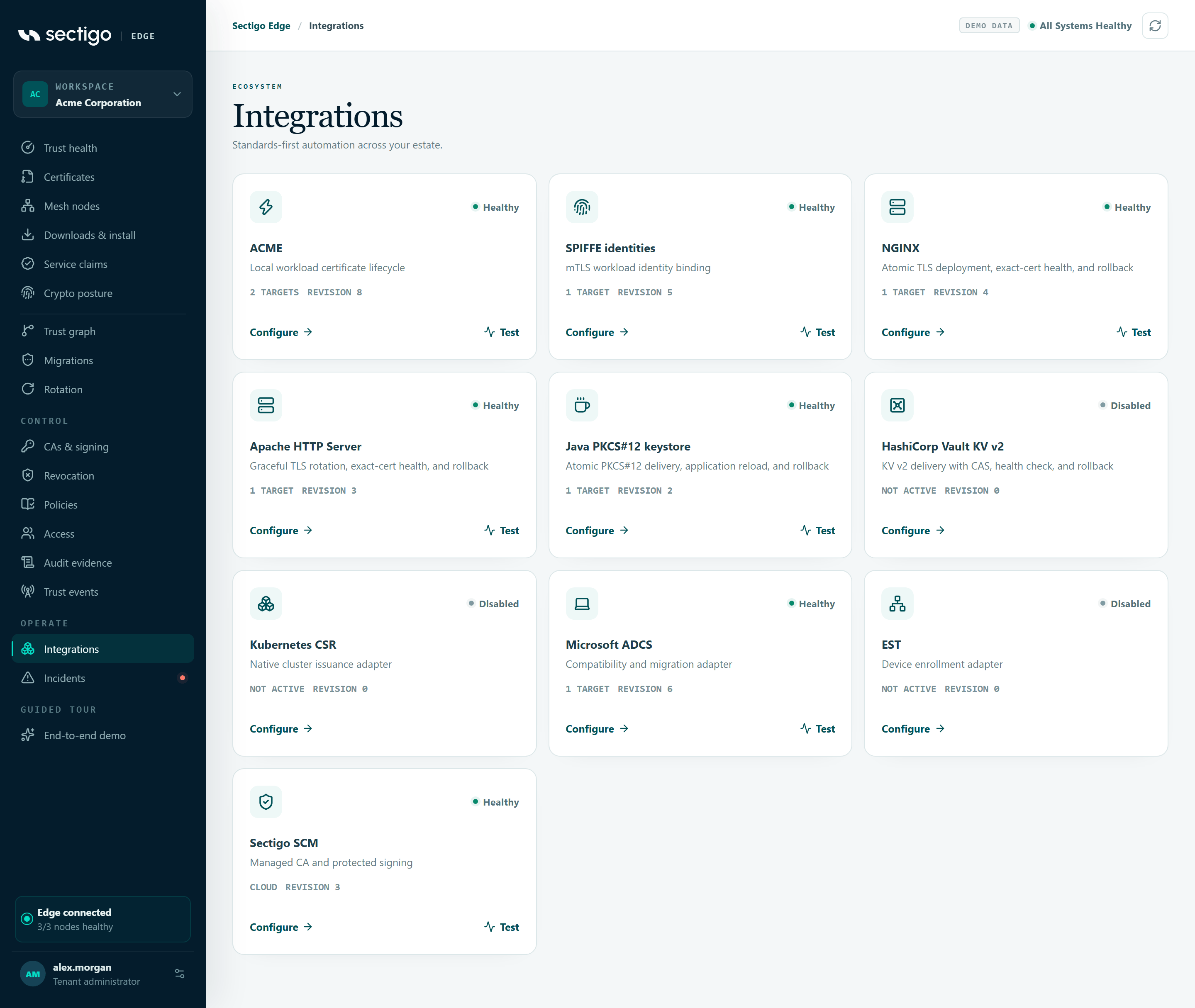
Each card shows the integration name, a one-line description, its status, any last error, where it runs and its revision, plus Configure and (when enabled) Test.
| Integration | Card description | Runs on | Guide |
|---|---|---|---|
| ACME | Local workload certificate lifecycle | Mesh Node | ACME |
| SPIFFE identities | mTLS workload identity binding | Mesh Node | SPIFFE / SPIRE |
| NGINX | Atomic TLS deployment, exact-cert health, and rollback | Linux Mesh Node | NGINX |
| Apache HTTP Server | Graceful TLS rotation, exact-cert health, and rollback | Linux Mesh Node | Apache |
| Java PKCS#12 keystore | Atomic PKCS#12 delivery, application reload, and rollback | Mesh Node | Java PKCS#12 |
| HashiCorp Vault KV v2 | KV v2 delivery with CAS, health check, and rollback | Mesh Node | HashiCorp Vault |
| Kubernetes CSR | Native cluster issuance adapter | Mesh Node | Kubernetes CSR |
| Microsoft ADCS | Compatibility and migration adapter | Windows Mesh Node | Microsoft ADCS |
| EST | Device enrollment adapter | Mesh Node | EST |
| Sectigo SCM | Managed CA and protected signing | Cloud | Sectigo SCM |
Card status
| Status | Meaning |
|---|---|
| Healthy | The exact current revision was applied and checked. |
| Awaiting node | Desired state or a test is waiting for the assigned Mesh Node to acknowledge it. |
| Degraded | The node rejected the configuration or could not operate the adapter. The card shows the error, for example adapter not configured. |
| Disabled | Not enabled. No authority or workload path is active. |
Card details
The left side of the footer shows where the integration runs:
| Text | Meaning |
|---|---|
| Not active | The integration is disabled. |
| Cloud | Sectigo SCM, which runs in the cloud rather than on a node. |
| No node assigned | Enabled, but no target node is selected. |
| n target(s) | Number of target Mesh Nodes. |
Revision increases every time desired state changes or a test is requested.
Configure an integration
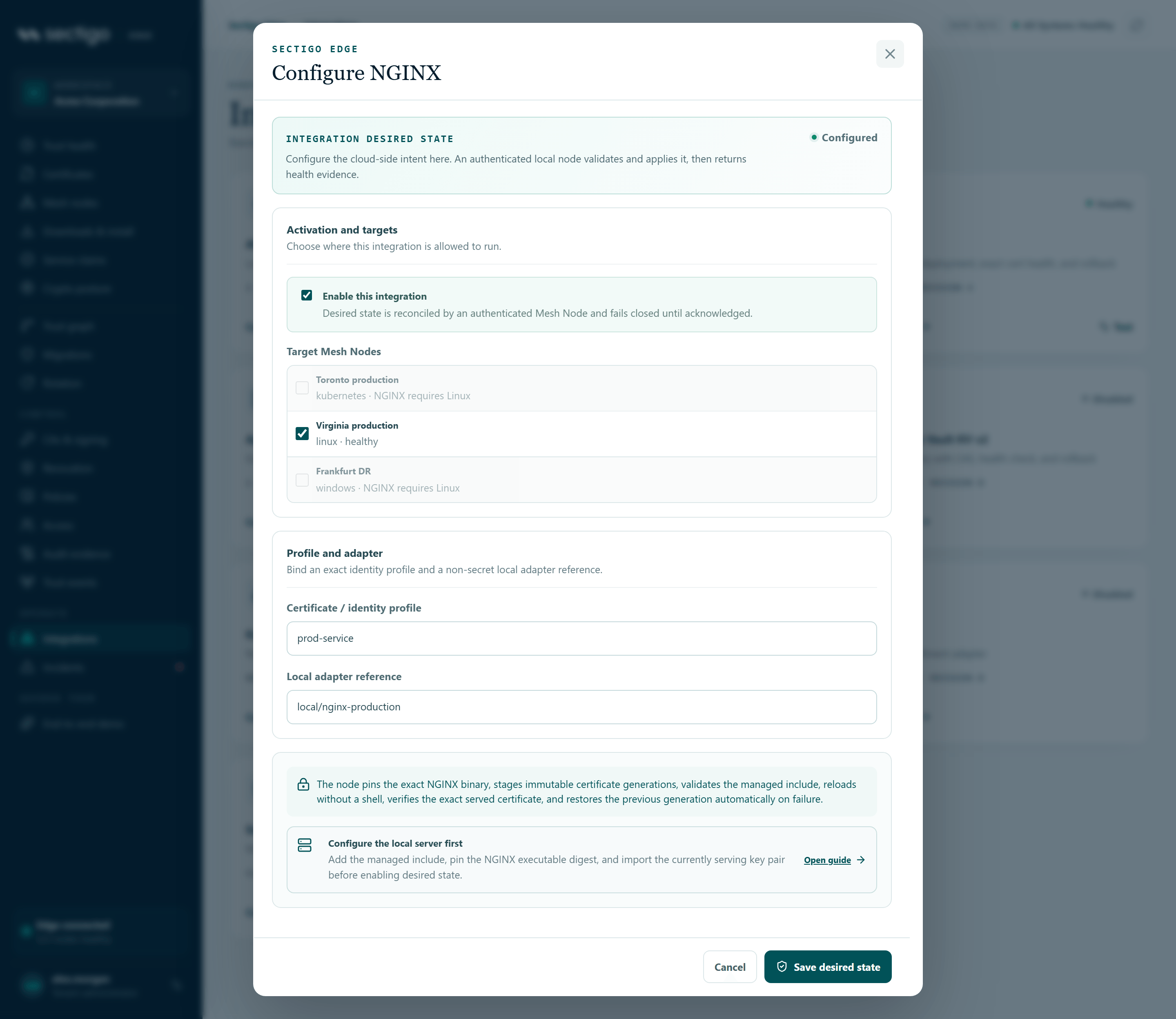
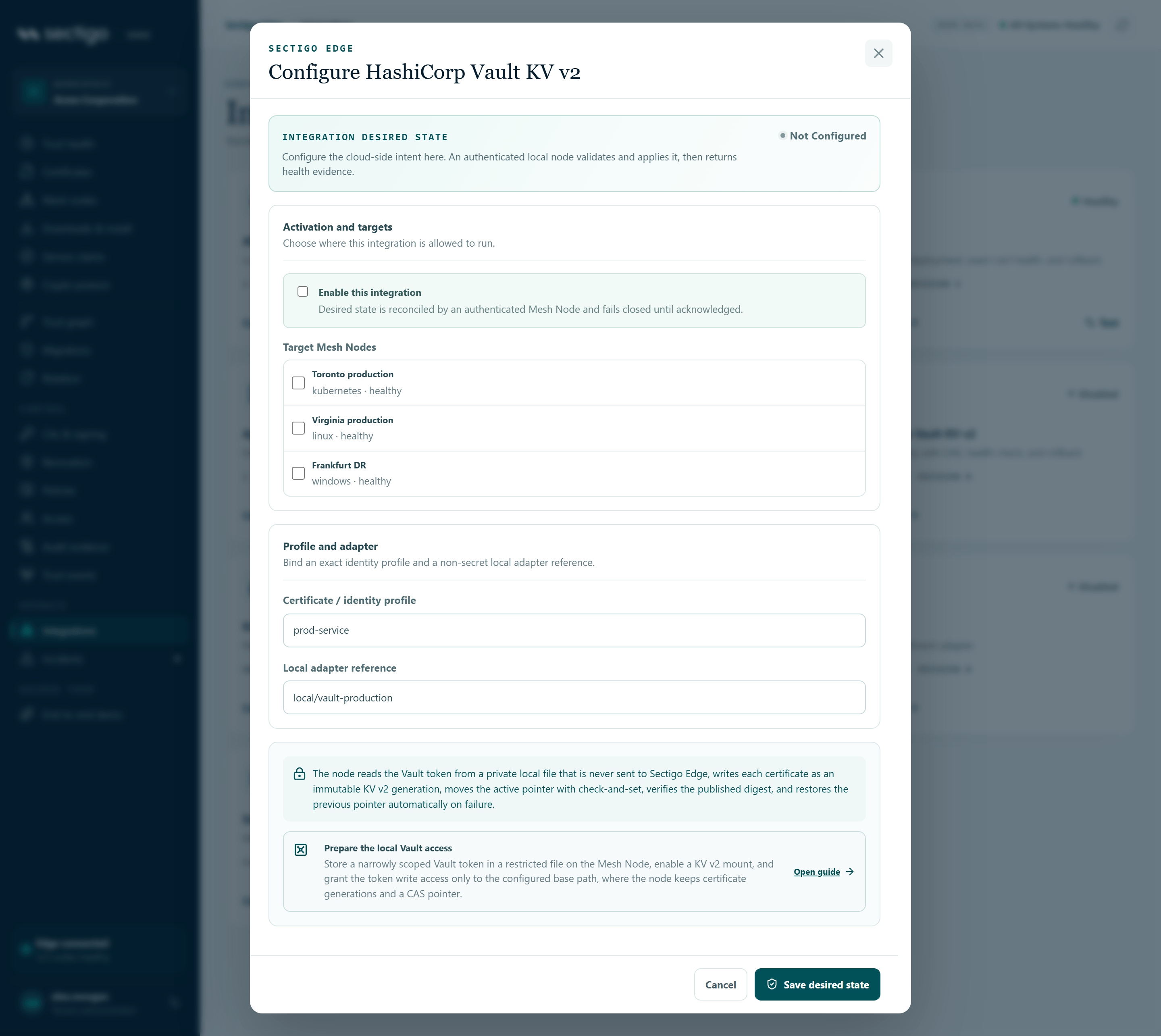
- On the integration's card, select Configure. The Configure dialog opens with INTEGRATION DESIRED STATE and a status of Configured or Not configured.
- Under Activation and targets, select Enable this integration. Desired state is reconciled by an authenticated Mesh Node and fails closed until acknowledged.
- Under Target Mesh Nodes, select the nodes allowed to run it (not shown for Sectigo SCM).
- Under Profile and adapter, enter the Certificate / identity profile, for example
prod-service. - Enter or check the Local adapter reference (not shown for Sectigo SCM).
- For Sectigo SCM, choose the Active SCM connector. For Microsoft ADCS, choose the ADCS public CA chain.
- Read the guidance at the bottom of the dialog and complete any local preparation first.
- Select Save desired state.
The console confirms Configuration saved. The assigned Mesh Node will reconcile it over its outbound channel. The card shows Awaiting node until the node acknowledges, then Healthy or Degraded.
To turn an integration off, clear Enable this integration and save. The console confirms Integration disabled and desired state updated.
Dialog fields
| Field | Shown for | Notes |
|---|---|---|
| Enable this integration | All | |
| Target Mesh Nodes | All except Sectigo SCM | NGINX and Apache require a Linux or container node; other nodes are disabled with requires Linux. |
| Certificate / identity profile | All | At least two characters. |
| Active SCM connector | Sectigo SCM | Lists your active SCM CA connectors. See CAs & signing. |
| Local adapter reference | All except Sectigo SCM | Fixed (read-only) for ACME and SPIFFE. Required when enabling Kubernetes CSR, Microsoft ADCS, EST, NGINX, Apache, Java keystore or HashiCorp Vault. |
| ADCS public CA chain | Microsoft ADCS | Lists your active bring-your-own CA connectors. The cloud uses this public chain to verify every certificate returned by the Windows node. ADCS credentials stay local. |
Default adapter references
When an integration has no adapter reference yet, the dialog suggests one. It must match a configuration on the Mesh Node.
| Integration | Default reference |
|---|---|
| Kubernetes CSR | local/kubernetes-incluster |
| Microsoft ADCS | local/adcs-production |
| EST | local/est-builtin |
| NGINX | local/nginx-production |
| Apache HTTP Server | local/apache-production |
| Java PKCS#12 keystore | local/java-production |
| HashiCorp Vault KV v2 | local/vault-production |
Local preparation shown in the dialog
| Integration | Guidance heading | What to do first |
|---|---|---|
| NGINX | Configure the local server first | Add the managed include, pin the NGINX executable digest, and import the currently serving key pair. |
| Apache HTTP Server | Configure the local server first | Include the managed TLS snippet in the target virtual host, pin the httpd executable digest, and import the currently serving key pair. |
| Java PKCS#12 keystore | Prepare the local Java runtime | Pin JDK keytool and the reload executable, create a restricted high-entropy password file, import the serving key pair, and point the application at the managed PKCS#12 path. |
| HashiCorp Vault KV v2 | Prepare the local Vault access | Store a narrowly scoped Vault token in a restricted file on the node, enable a KV v2 mount, and grant write access only to the configured base path. |
| ACME | Create a node-bound external account | Generate a distinct short-lived EAB credential and ACME account for every named primary or failover node. Never send account traffic through random load balancing. |
| Microsoft ADCS | CA-signed revocation distribution | The Windows node publishes and retrieves each CRL through native ADCS administration APIs. |
Test an integration
Test appears on enabled integrations. It asks the assigned Mesh Node (or, for Sectigo SCM, the cloud service) to check the integration end to end and report the result.
- On an enabled card, select Test.
- Read the message that appears.
| Message | Meaning |
|---|---|
| Test queued. The Mesh Node will report the adapter result over its authenticated outbound channel. | Node-hosted integrations. The card shows Awaiting node and then the result. |
| Integration test passed. | Sectigo SCM connectivity was verified. |
| Test recorded, but connectivity was not verified (error code). | Sectigo SCM could not be reached or is misconfigured. The error code, if any, is shown in parentheses. Check the connector on CAs & signing. |
Open configuration from a link
You can open an integration's configuration directly with the configure query parameter, for example ?view=integrations&configure=nginx. Configure SCM integration in CAs & signing uses the same mechanism.
Permissions
| Action | Roles |
|---|---|
| View integrations | Every role |
| Configure or test node-hosted integrations | PKI Operator, Tenant Admin. Requires MFA within the last ten minutes. |
| Configure or test Sectigo SCM | Tenant Admin. Requires MFA within the last ten minutes. |
Troubleshooting
| Symptom | Cause and fix |
|---|---|
| Save desired state is greyed out | The profile is shorter than two characters; or the integration is enabled but has no target node; or (SCM) no connector is selected; or (ADCS) no CA chain is selected; or a required adapter reference is empty. |
| A node is greyed out with requires Linux | NGINX and Apache run only on Linux or Linux-container nodes. |
| Active SCM connector has no options | No SCM connector is active. Connect one on CAs & signing, and make sure its enrollment IDs are complete. |
| Card stays Awaiting node | The target node has not picked up the new revision. Check that it is healthy on Mesh nodes. |
| Card is Degraded with an error | The node could not apply the configuration. Check the adapter reference matches the node's local configuration and follow the integration guide. |
| An error appears in the dialog when saving | The message comes from the service. A common cause is MFA older than ten minutes. |