NGINX
The NGINX adapter lets a Linux Mesh Node rotate the certificate of an NGINX TLS server without downtime and with automatic rollback. The node keeps every certificate as an immutable generation, switches an atomic current link, validates the fully expanded NGINX configuration, reloads NGINX gracefully (new workers start before old ones retire) and only commits when NGINX is serving the exact new leaf certificate.
The node never runs a shell or a configurable hook: it only invokes the SHA-256-pinned NGINX executable with fixed arguments (-T -c <config> to test and -s reload -c <config> to reload) and re-checks the pin before every run.
Requirements
- A Linux (or Linux-container) Mesh Node on the same host or security boundary as NGINX.
- NGINX and the Mesh Node running under the same dedicated Unix identity, because the user sending the reload signal must control the NGINX master process. Do not run the node as root just to reload a host web server.
- A certificate and matching private key that NGINX is serving today (imported as generation one; the adapter never invents an initial identity).
- An HTTPS health endpoint on the service whose hostname is covered by the certificate.
Prepare the host
- Pin the executable. Find the exact binary and compute its SHA-256 (below).
- Create the managed directory owned by the node's user, for example
/var/lib/sectigo-edge/nginx. - Allow the service to write it. The installed systemd unit only permits writes to
/var/lib/edgepki. Add a drop-in withReadWritePaths=for the managed directory (below). - Copy the current key pair to bootstrap files readable only by the node's user.
- Include the managed snippet in the TLS
serverblock (below) and remove any otherssl_certificate/ssl_certificate_keylines from that block.
command -v nginx
/usr/sbin/nginx
sha256sum /usr/sbin/nginx
3f8a1c0d9e7b6a5f4e3d2c1b0a9f8e7d6c5b4a3f2e1d0c9b8a7f6e5d4c3b2a19 /usr/sbin/nginx
sudo install -d -o edgepki -g edgepki -m 0700 /var/lib/sectigo-edge/nginx
sudo systemctl edit edgepki-node
### add these lines in the editor, then save:
[Service]
ReadWritePaths=/var/lib/sectigo-edge/nginx
The digest shown is an example — always compute your own. Re-pin after every NGINX package update; a changed binary makes the adapter fail closed.
Managed include
Include the node-managed snippet in the exact server block whose certificate Sectigo Edge manages:
server {
    listen 443 ssl;
    server_name payments.internal.example;
    include /var/lib/sectigo-edge/nginx/sectigo-edge-tls.conf;

    location = /health {
        access_log off;
        return 200 "healthy";
    }
}
The node writes sectigo-edge-tls.conf itself (ssl_certificate and ssl_certificate_key pointing into current/) and replaces any local edits. Its layout:
/var/lib/sectigo-edge/nginx/
  current -> generations/slot-000042
  current.json
  sectigo-edge-tls.conf
  generations/
    slot-000041/{certificate.pem,private-key.pem}
    slot-000042/{certificate.pem,private-key.pem}
Private keys are mode 0600, generations are never modified, and the manifest is written with fsync.
Node configuration
Add to config.json (example values), then validate and restart the node (Configuration reference):
{
  "nginx_enabled": true,
  "nginx_adapter_reference": "local/nginx-production",
  "nginx_profile_id": "prod-service",
  "nginx_binary_path": "/usr/sbin/nginx",
  "nginx_binary_sha256": "<64 lowercase hexadecimal characters>",
  "nginx_configuration_file": "/etc/nginx/nginx.conf",
  "nginx_managed_directory": "/var/lib/sectigo-edge/nginx",
  "nginx_bootstrap_certificate_file": "/etc/sectigo-edge/bootstrap/server-chain.pem",
  "nginx_bootstrap_private_key_file": "/etc/sectigo-edge/bootstrap/server-key.pem",
  "nginx_reload_timeout_seconds": 10,
  "nginx_rollback_window_seconds": 3600
}
| Key | Limit |
|---|---|
| All paths | Absolute, regular files (no symbolic links for the binary, configuration and bootstrap pair) |
nginx_binary_sha256 | 64 lowercase hex characters |
nginx_reload_timeout_seconds | 2–60 |
nginx_rollback_window_seconds | 60–86400 |
The node refuses to start if the platform, paths, identifiers, digest, time bounds, initial key pair or file types are unsafe.
Configure in the console
- Open ConsoleIntegrations and select Configure on the NGINX card.
- Select Enable this integration.
- Under Target Mesh Nodes, select the Linux node (non-Linux nodes are disabled with "NGINX requires Linux").
- Enter the Certificate / identity profile — exactly
nginx_profile_id(for exampleprod-service). - Enter the Local adapter reference — exactly
nginx_adapter_reference(for examplelocal/nginx-production). - Select Save desired state. The card shows Awaiting node until the node acknowledges the revision as Healthy.
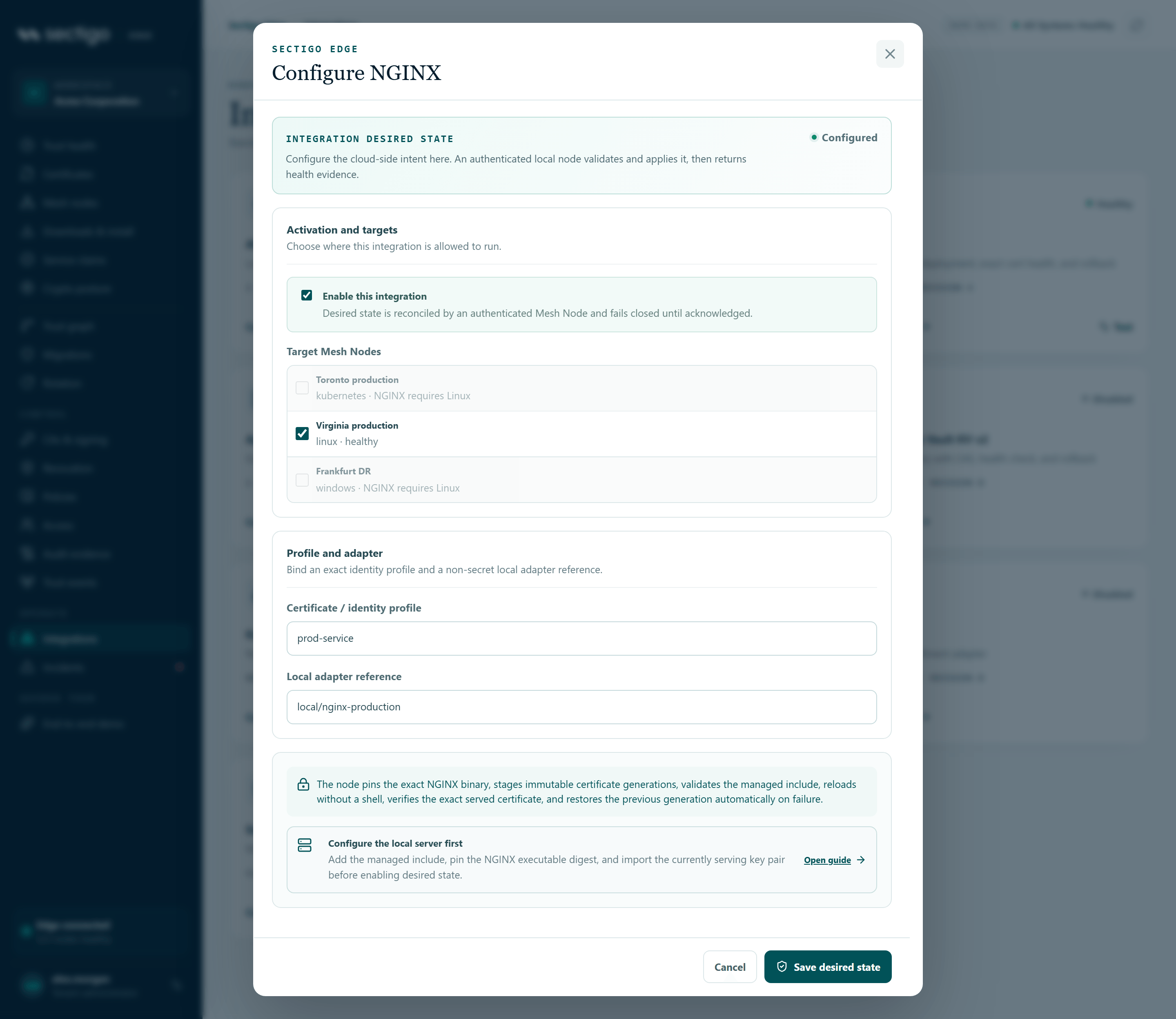
Rotation stays denied until that node acknowledges the exact current revision as healthy.
Policy requirements
In ConsolePolicies, the workload profile used for NGINX must:
- include
nginxin allowed deployment modes; - contain an explicit signed rotation block with
mode: dual_slot, bounded health-grace and rollback windows, and a promotion mode ofautomatic_after_healthormanual. Without a rotation block no automatic activation is allowed.
The node binds these exact values into its durable deployment intent and re-checks them before activation.
How rotation works
- A workload (or your automation) holding an allowed SVID asks the node to rotate:
curl --cacert local-api-ca.pem --cert payments-svid.pem --key payments-svid-key.pem \
-H 'content-type: application/json' \
https://127.0.0.1:9443/v1/managed/rotate -d '{
"requester": "spiffe://acme-corp.example/prod/payments",
"profileId": "prod-service",
"sans": ["payments.internal.example"],
"validitySeconds": 86400,
"healthUrl": "https://payments.internal.example/health",
"autoPromote": true,
"integrationKind": "nginx",
"adapterReference": "local/nginx-production"
}'
- The node generates the key and CSR, writes a private, fsync-backed intent (transaction, CSR, key, SANs, profile, adapter reference, desired-state revision) and retains the signed request in its outbox.
- After both trust domains approve, the certificate is written to a new generation while the old one keeps serving.
- The node switches
current, runsnginx -T(the expanded configuration must contain the managedssl_certificatelines) andnginx -s reload. - The node calls the health URL. It must use HTTPS, be covered by a requested SAN, resolve to permitted non-loopback addresses (pinned for the probe), stay on the same host across redirects, return 2xx and present the exact new leaf certificate.
- Success commits the generation and keeps the previous one for
nginx_rollback_window_seconds. Any failure restores the previouscurrentlink, re-tests and reloads it.
With autoPromote: false (or promotion: manual in policy) the certificate is staged only. An operator with fresh MFA then opens ConsoleRotation, enters the Exact health URL and selects Verify & promote. The console only queues a command; the node revalidates policy, revision, transaction, generation, slot and certificate digest, runs the same promotion and rollback logic, and the console changes state only after the node's signed completion. See Rotation.
Recovery guarantees
- A crash at any point resumes the same transaction; no second key or certificate is created.
- An interrupted promotion is rolled back to the previous generation before the adapter can report healthy again.
- If rollback itself cannot be verified, the pending marker stays and the integration reports Degraded — it never silently declares success.
- Abandoned intents expire within a bounded window so private keys are not kept indefinitely.
Verify
openssl s_client -connect payments.internal.example:443 -servername payments.internal.example </dev/null 2>/dev/null \
| openssl x509 -noout -serial -enddate
serial=4C1D9A7E52B03F68
notAfter=Oct 2 14:31:07 2026 GMT
readlink /var/lib/sectigo-edge/nginx/current
generations/slot-000043
sectigo-edge status lists the adapter with "kind": "nginx", "health": "healthy" and its manifest (generation, active, previous, rollback_until). Promotions also appear as certificate.promoted trust events and in the edgepki_node_rotations_promoted_total metric.
Troubleshooting
| Code or message | Meaning | What to do |
|---|---|---|
nginx_not_configured | The assigned node has no NGINX settings | Add the keys and restart the node |
adapter_reference_invalid / profile_not_mapped | Console and config.json disagree | Make reference and profile identical |
nginx_configuration_invalid | nginx -T failed or the managed include is not bound in the expanded configuration | Fix the configuration; make sure the include is inside the managed server block |
nginx_active_pointer_invalid | current does not point at the recorded active generation | Restore the link or investigate local tampering |
nginx_recovery_pending | An interrupted promotion or rollback is unresolved | Check the node log; fix the cause (binary, config, permissions) so recovery can complete |
nginx_state_invalid | The manifest (current.json) cannot be read or verified | Investigate local changes to the managed directory |
nginx_integration_unavailable / nginx_integration_binding_mismatch (rotate request rejected) | The integration is not healthy for this node, or the request's adapter reference/profile does not match | Fix desired state first; resend with the exact reference |
| Node fails to start after enabling | Unsafe path, wrong digest, mismatched bootstrap pair or non-Linux node | Run edgepki-node -validate-config for the exact reason |
| Reload fails with permission errors | The node's user cannot signal the NGINX master or read files nginx -T loads | Run NGINX under the node's identity and grant read access |
Rollback windows, manual promotion and fleet-wide practices are covered in Zero-downtime rotation.