Zero-downtime rotation
Sectigo Edge rotates certificates with two slots, active and standby. The new certificate is issued and staged next to the one that is serving. It only replaces the serving certificate after a health check proves that your service presents the exact new certificate. If anything fails, the old certificate keeps serving.
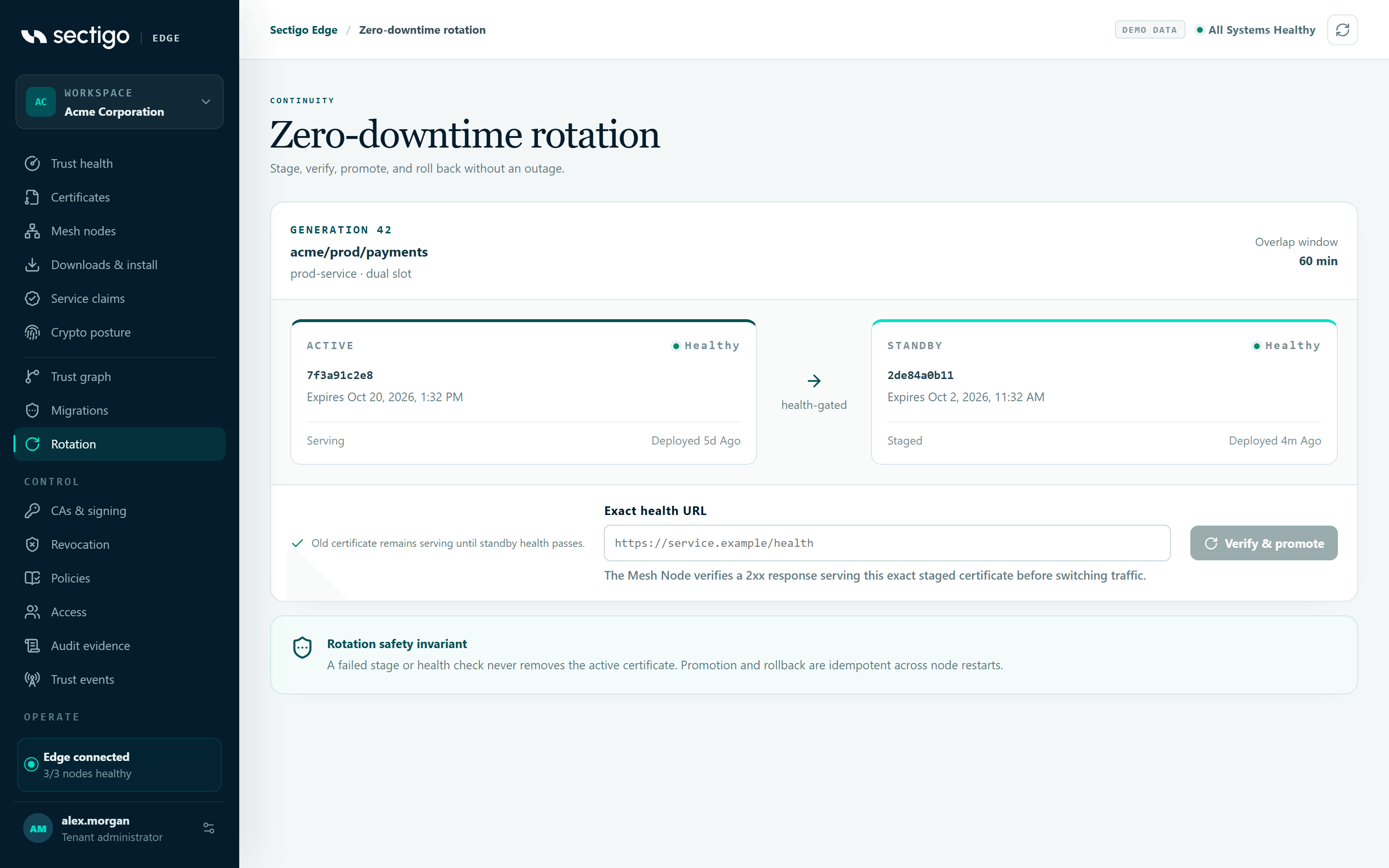
How dual-slot rotation works
| Stage | What happens | What is serving |
|---|---|---|
| Issue | The Mesh Node generates a new key locally, gets both trust domains to approve, and receives the certificate. | Old certificate |
| Stage | The new certificate and key are written to a new, numbered slot and become the standby. The key never leaves the node. | Old certificate |
| Health check | The node opens a fresh HTTPS connection to your health URL and checks that the service returns 2xx while presenting the exact staged certificate. | Old certificate |
| Promote | Only after the check passes, the standby becomes active. The previous certificate is kept as the rollback target. | New certificate |
| Rollback window | During the configured window, a failed check after promotion restores the previous generation automatically. | New, or restored old |
A failed stage or health check never removes the active certificate. Promotion and rollback are idempotent across node restarts, so a crash part-way through resumes the same rotation. It does not create a second key or certificate.
Rotation settings
Rotation is controlled by the rotation block of each workload profile in your signed policy. To edit it, go to ConsolePoliciesConfigure next version and use the profile's rotation fields. Like every policy change, it takes effect only after a second person approves it. See Policy changes & approvals.
| Console field | Policy key | Allowed range | Meaning |
|---|---|---|---|
| Mode | mode | dual_slot or in_place | Dual slot is required for every activating deployment path (NGINX, Apache, Java PKCS#12, HashiCorp Vault and generic dual slot). It is set for you when you select one of those deployment paths. |
| Renew before (hours) | renew_before_seconds | 5 minutes up to the profile's maximum lifetime | The renewal lead time: how long before the active certificate expires its replacement should be issued and staged. |
| Overlap (minutes) | overlap_seconds | 0 to 7 days | The overlap window shown on the rotation card, during which the old and new generations are both valid. |
| Health grace (seconds) | health_check_grace_seconds | 10 to 3,600 | The health-check grace period bound into every deployment. The node refuses a deployment whose bound value differs from the active policy. |
| Promotion | promotion | manual or automatic_after_health | Who switches traffic. See below. |
| Rollback window (minutes) | rollback_window_seconds | 1 minute to 24 hours | How long the previous generation stays available for automatic restoration after promotion. |
If a profile has no explicit rotation block, the policy editor starts from these defaults: renew 7 days before expiry (or the maximum lifetime, if that is shorter), 60 minutes overlap, 300 seconds health grace, manual promotion and a 60-minute rollback window.
Each adapter also has a local rollback window setting in the node configuration, for example nginx_rollback_window_seconds (60 to 86,400). See Node configuration.
Manual versus automatic promotion
Operator verifies & promotes (manual) | Automatic after exact health (automatic_after_health) | |
|---|---|---|
| Who promotes | An operator, from ConsoleRotation | The Mesh Node, as soon as the health check passes |
| Available for | Any dual-slot profile | Only profiles that allow an activating adapter: NGINX, Apache, Java PKCS#12 or HashiCorp Vault |
| Good for | First rollouts, sensitive services, change-window controlled estates | High-volume, short-lived certificates where a human gate adds no value |
| If a workload asks for auto-promotion under a manual profile | — | Refused with automatic_promotion_forbidden |
The policy editor disables Automatic after exact health until the profile allows one of the activating deployment paths. If you later remove the last of those paths, the profile switches back to manual.
Promote a staged certificate manually
- Open ConsoleRotation. Find the certificate set. Its card shows the ACTIVE and STANDBY slots and the current GENERATION.
- Check that the standby slot is populated. Sets without a standby cannot be promoted. The API returns
standby_not_staged. - In Exact health URL, enter an
https://URL whose host name is covered by the staged certificate's SANs. The console pre-fills one from the first non-wildcard SAN. - Select Verify & promote. The button changes to Awaiting Mesh Node while the command is pending.
- Wait for the node to report back. The card refreshes when the node's signed completion arrives, and the generation advances.
The console does not switch certificates itself. It queues a command bound to the policy, transaction, node, adapter revision, slot and certificate digest. Only the assigned Mesh Node can carry it out. Active state changes only when that node reports that exact command complete.
Console promotion needs a crash-safe activating adapter (NGINX, Apache, Java PKCS#12 or HashiCorp Vault). A plain dual-slot set without one returns promotion_adapter_required. In that case the promotion happens on the node, through your own automation.
Health URL rules
The node treats the health URL as untrusted input and probes it safely:
- It must be an absolute
https://URL with no credentials and no fragment, or you getpromotion_health_url_invalid. - Its host must be covered by the staged certificate's SANs, or you get
promotion_health_url_forbidden. - The response must be
2xx, and the TLS server certificate must be the exact staged leaf. A healthy response from the old certificate does not count. - DNS answers are pinned for the probe. Prohibited addresses are filtered, and redirects must stay on the same host.
A minimal NGINX health location looks like this:
location = /health {
    access_log off;
    return 200 "healthy";
}
Trigger a rotation from a workload
A workload authenticated to its local Mesh Node with its SPIFFE identity starts a rotation through the node's local API (POST /v1/managed/rotate). The request names the profile, SANs, health URL, deployment adapter, and whether to promote automatically. The integration pages show complete examples. Start with NGINX.
Before issuing anything, the node checks:
- The adapter's desired state is healthy on this node. If not, the request fails with
<adapter>_integration_unavailable, for examplenginx_integration_unavailable. - The adapter reference and profile match the active desired state. If not, the request fails with
<adapter>_integration_binding_mismatch. - The profile has an explicit signed dual-slot rotation block. If not, the request fails with
rotation_policy_required.
Verify a rotation end to end
After a promotion, confirm all four of the following:
| Check | How |
|---|---|
| The console shows the new generation as active | ConsoleRotation: the generation advanced, the standby slot is empty and the card no longer shows pending verification. |
| The service presents the new certificate | Compare the serial number of the certificate your endpoint serves with the active slot. |
| The node agrees | Run sectigo-edge integrations on the node and check the adapter's manifest.active and rollback_until. |
| The audit trail is complete | ConsoleAudit evidence shows certificate.staged followed by certificate.promoted for the set. |
sectigo-edge -ca /etc/sectigo-edge/ca.pem \
-cert /run/spire/svid.pem -key /run/spire/svid-key.pem integrations
{
"node_id": "node_7f3c9a",
"integrations": [
{
"kind": "nginx",
"installed": true,
"health": "healthy",
"manifest": {
"generation": 4,
"active": "slot-000004",
"previous": "slot-000003",
"promoted_at": "2026-10-01T14:02:11.482Z",
"rollback_until": "2026-10-01T15:02:11.482Z"
}
}
]
}
What to watch
| Signal | Where | Meaning |
|---|---|---|
| Expiry exposure greater than 0 | ConsoleTrust health | Active certificates expire within 30 days. Check that their rotation is running. |
| Card stuck on Awaiting Mesh Node | ConsoleRotation | The node has not reported the promotion. Check that the node is online and the adapter is healthy. |
Adapter health: degraded with *_recovery_pending | sectigo-edge integrations | A promotion or rollback could not be verified. The node keeps the pending marker and retries. It never declares success silently. |
edgepki_node_rotations_promoted_total | Node /metrics | Counts health-gated promotions. A flat line during a renewal period means rotations are not completing. |
certificate.rotation_deployment_failed | Audit evidence | A deployment failed on the node. The event records the integration and reason. |
Rollback
You do not need to roll back by hand when a health check fails. The adapter restores the previous generation, re-tests, reloads and verifies it. If that restoration cannot be verified, the adapter stays degraded with a *_recovery_pending code until it can prove which certificate is serving. See Troubleshooting.
The previous generation is kept only for the rollback window. After it expires, the only way to go back is a new rotation.
Related
- Rotation console reference
- Cryptographic migrations: coordinated, wave-based promotion across many certificate sets
- Revocation & CRL/OCSP: promoting a healthy standby before revoking a compromised certificate