Audit & evidence export
Every privileged action, approval, node report and certificate operation in Sectigo Edge is added to a hash-chained audit log. Each event commits to the one before it, so any deletion or edit breaks the chain. You can check that chain in three ways:
| Method | What it proves | Who uses it |
|---|---|---|
| Console integrity check | The events loaded in your browser link correctly and end at the reported chain head. | Operators, day to day |
| Portable proof export | One issuance or revocation was approved by both trust domains, signed and anchored in a customer-witnessed checkpoint. | Auditors, verifying offline |
| OTLP audit export | Each Mesh Node streams its own signed audit journal to your SIEM. | Security operations |
Check the audit chain in the console
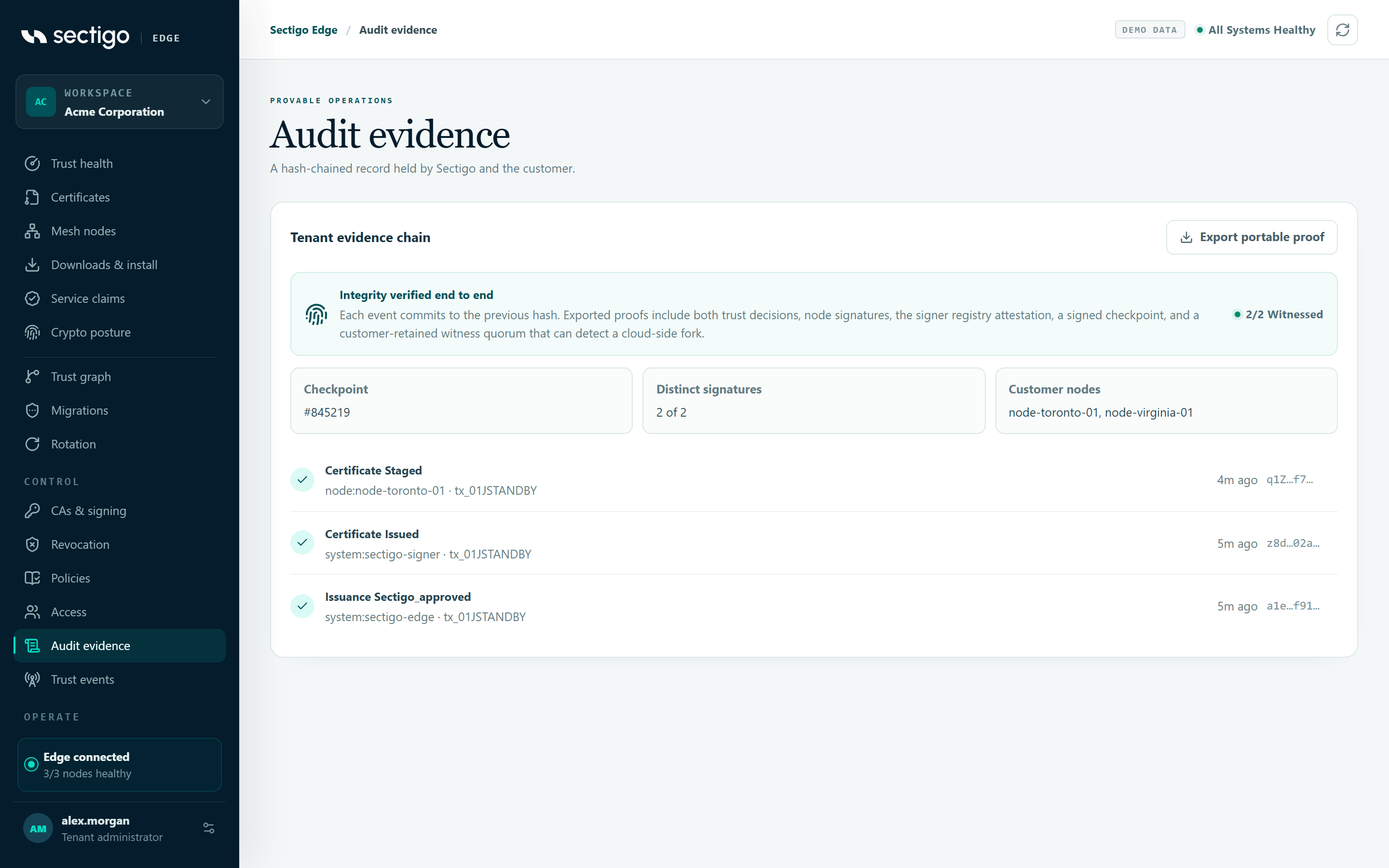
ConsoleAudit evidence re-computes the hash of every loaded event in your browser and shows one of these labels:
| Label | Meaning | Action |
|---|---|---|
| Verifying audit chain… | The check is still running. | Wait. |
| No audit events yet | The chain starts with the first recorded action. | None. |
| Chain verified from genesis | Every event from the first one has been re-hashed and links correctly. | None. |
| Recent events verified | The loaded window (events #from–#to) is verified. Older events are covered by exported proofs. | None. |
| Audit chain could not be verified | An event does not match its recorded hash or predecessor link, or the window does not end at the reported head. | Refresh. If the label persists, export a proof and investigate. Treat this as a potential incident. |
The banner also shows the customer witness quorum: how many of your Mesh Nodes have independently checked and signed the latest checkpoint, for example 2/2 witnessed. Because the witnesses are your own nodes, a cloud-side fork of the log can be detected.
| Field | Meaning |
|---|---|
| Checkpoint | The sequence number of the latest signed checkpoint, or Not anchored |
| Distinct signatures | Witness signatures received, out of the number required |
| Customer nodes | The nodes that witnessed it, or Waiting for an eligible Mesh Node |
Export a portable proof
A portable proof is a single JSON bundle for one transaction (an issuance, plus its revocation if there is one). It can be verified without access to Sectigo, Cloudflare or your Mesh Nodes.
- Open ConsoleAudit evidence.
- Select Export portable proof. The console exports the most recent transaction in the loaded events and downloads
sharppki-evidence-<transaction-id>.json. - To export a specific transaction, call the API directly:
POST /api/v1/transactions/<transaction-id>/evidence.
Export creates a fresh checkpoint and waits until enough of your Mesh Nodes have witnessed it. If not enough have, export fails with:
audit_customer_witness_pending: Customer audit witness quorum is pending (1/2); keep eligible Mesh Nodes connected and retry
Keep the eligible nodes online and retry. Witnessing happens over the nodes' normal outbound connection.
What the bundle proves
- The manifest has not changed since export.
- Every customer approval signed the identical transaction. The quorum consists of distinct, independently pinned Mesh Node keys.
- Your decision and Sectigo's decision allowed the same policy version, policy content, workload profile, algorithm and lifetime.
- Any capability evidence used was fresh at the time of the transaction.
- The protected signer's receipt binds the evidence, CA provider, key reference, certificate serial, validity and the signer registry generation.
- An unbroken hash-chain path leads to a signed audit checkpoint that a quorum of your nodes witnessed.
- If the certificate was revoked, the revocation has its own signer receipt and audit commitment.
Verify a proof offline
The verifier is the sharppki-verify command from the Sectigo Edge workspace's evidence-verifier package. It is not published to a public registry. Build the workspace once with npm run build, then run the command with npx from inside the workspace. Never trust the public keys that come inside a bundle. The verifier uses only the keys in a trust file that you build from your own independent records.
-
Build a trust file,
pinned-trust.json, from keys you collected independently:{"audit_keys": { "audit-production-2026-01": "<base64url Ed25519 public key>" },"protected_signer_keys": { "receipt-production-1": "<base64url Ed25519 public key>" },"registries": { "42": "<base64url canonical registry SHA-256>" },"nodes": {"node-production-a": "<base64url Ed25519 public key>","node-production-b": "<base64url Ed25519 public key>"},"minimum_audit_witnesses": 2} -
Set
minimum_audit_witnessesto your approved customer witness policy. It defaults to 1. Use 0 only for legacy evidence created before customer witnessing existed. -
Run the verifier.
- Linux / macOS
- Windows
npx sharppki-verify --evidence sharppki-evidence-tx_7d41c2.json --trust pinned-trust.json
{
"verified": true,
"tenant_id": "acme-corp",
"transaction_id": "tx_7d41c2",
"manifest_sha256": "x3k9Qw...",
"checkpoint_sequence": 18342,
"audit_witness_node_ids": ["node-production-a", "node-production-b"],
"signer_registry_version": 42,
"approver_node_ids": ["node-production-a"],
"certificate_serial": "4f1a9c0e7b22d3",
"status": "issued"
}
npx sharppki-verify --evidence sharppki-evidence-tx_7d41c2.json --trust pinned-trust.json
{
"verified": true,
"tenant_id": "acme-corp",
"transaction_id": "tx_7d41c2",
"checkpoint_sequence": 18342,
"status": "issued"
}
A failed verification prints the reason and exits with a non-zero status. The verifier rejects missing, duplicate, untrusted, rebound or under-quorum witness receipts. It checks capability freshness against the time of the transaction, so archived proofs remain valid after the evidence itself has expired.
Keep every audit, signer, registry and node key generation for at least the full retention period of your certificates, revocations and evidence. Removing an old key does not revoke old evidence, but it makes that evidence impossible to verify.
Export node audit logs to your SIEM (OTLP)
Each Mesh Node can stream its complete signed audit journal to an OpenTelemetry Collector over OTLP/HTTP. The collector address, trust roots and client credential stay in your environment. They are never sent to the cloud.
Add these settings to the node's config.json:
{
  "otlp_audit_enabled": true,
  "otlp_audit_exporter_id": "primary-siem",
  "otlp_audit_endpoint": "https://otel-collector.example.com:4318/v1/logs",
  "otlp_audit_trust_bundle_file": "/etc/edgepki/otel/ca.pem",
  "otlp_audit_client_certificate_file": "/etc/edgepki/otel/client.pem",
  "otlp_audit_client_private_key_file": "/etc/edgepki/otel/client-key.pem",
  "otlp_audit_batch_size": 32,
  "otlp_audit_request_timeout_seconds": 10,
  "otlp_audit_poll_interval_seconds": 5
}
| Setting | Rule |
|---|---|
otlp_audit_endpoint | Must be exactly https://host[:port]/v1/logs. No user info, query string, fragment, plain HTTP or redirects. Proxy environment variables are ignored. |
| Transport | TLS 1.3, with a separately pinned collector CA bundle and a valid client certificate (client-auth EKU). |
| Client key file | A regular file, not a symlink, readable only by the node service. On Windows, an inheritance-protected DACL limited to the service identity, SYSTEM and Administrators. |
otlp_audit_batch_size | 1–64 |
otlp_audit_request_timeout_seconds | 2–60 |
otlp_audit_poll_interval_seconds | 1–300 |
| Disabled exporter | Leave out every other otlp_audit_* field. Leftover settings are rejected, not ignored. |
Delivery is at least once. The node advances its signed cursor only after the collector accepts the whole batch. Use the x-sectigo-edge-audit-batch header as your deduplication key. Each log body is the complete node-signed event. Keep it unchanged so it can be verified later.
If the collector is unreachable, a backlog builds up but nothing is lost. The node reports degraded and keeps working as a trust participant. For Helm, use otlpAudit.enabled, otlpAudit.exporterId, otlpAudit.endpoint and otlpAudit.existingSecret. See Kubernetes (Helm).
Monitoring for the exporter is covered in Monitoring & alerts.