Policy changes & approvals
Your enterprise cryptographic policy decides which algorithms, lifetimes, deployment paths, approval quorums and issuance guardrails apply to every certificate. A policy change can never take effect on one person's say-so. Every new version follows the same path:
propose → estate impact assessment → second approver → activation
Each approval is bound to an exact digest. If the policy or the estate changes in between, the approval is invalidated.
The three policy layers
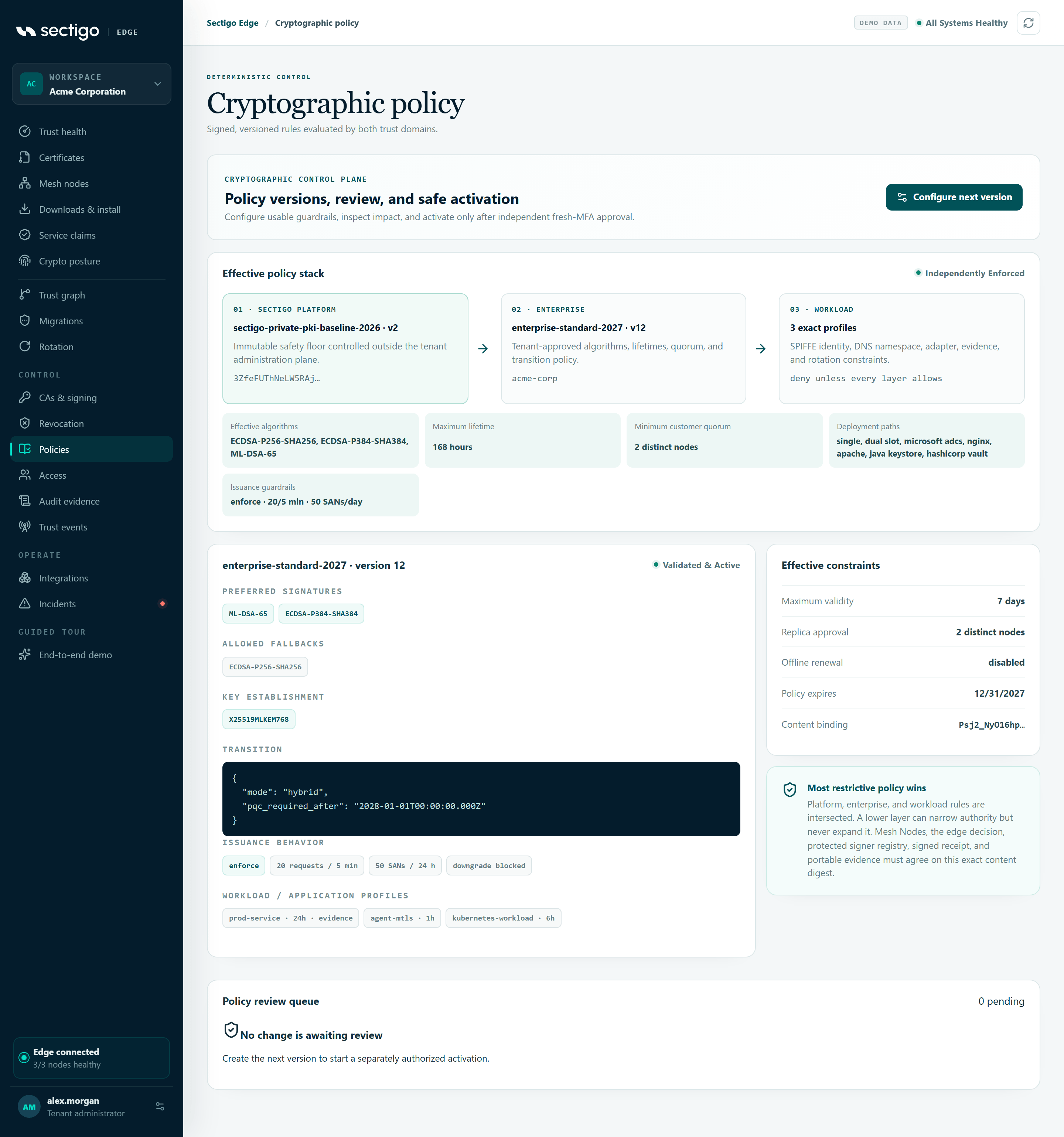
Every issuance is checked against three layers. The result is their intersection: a lower layer can only narrow what a higher layer allows.
| Layer | Owned by | You can change it? |
|---|---|---|
| Sectigo platform baseline | Sectigo | No. It is shown in the Effective policy stack card as independently enforced, and the policy editor cannot weaken it. |
| Enterprise policy | Your policy managers | Yes, through the approval workflow on this page. |
| Workload / application profile | Your policy managers, as part of the enterprise policy | Yes. A profile narrows requester identity, DNS names, algorithm, lifetime, deployment path and capability evidence. |
For guardrails, "stricter" means enforcing mode, lower velocity and SAN ceilings, downgrade protection and a longer evidence window.
If the platform baseline is missing, expired or not yet effective, issuance stops with platform_policy_not_configured and the stack shows platform policy unavailable or platform policy expired. When Sectigo changes the baseline, pending enterprise proposals become stale and must be refreshed. See Refresh a stale proposal.
Propose a new version
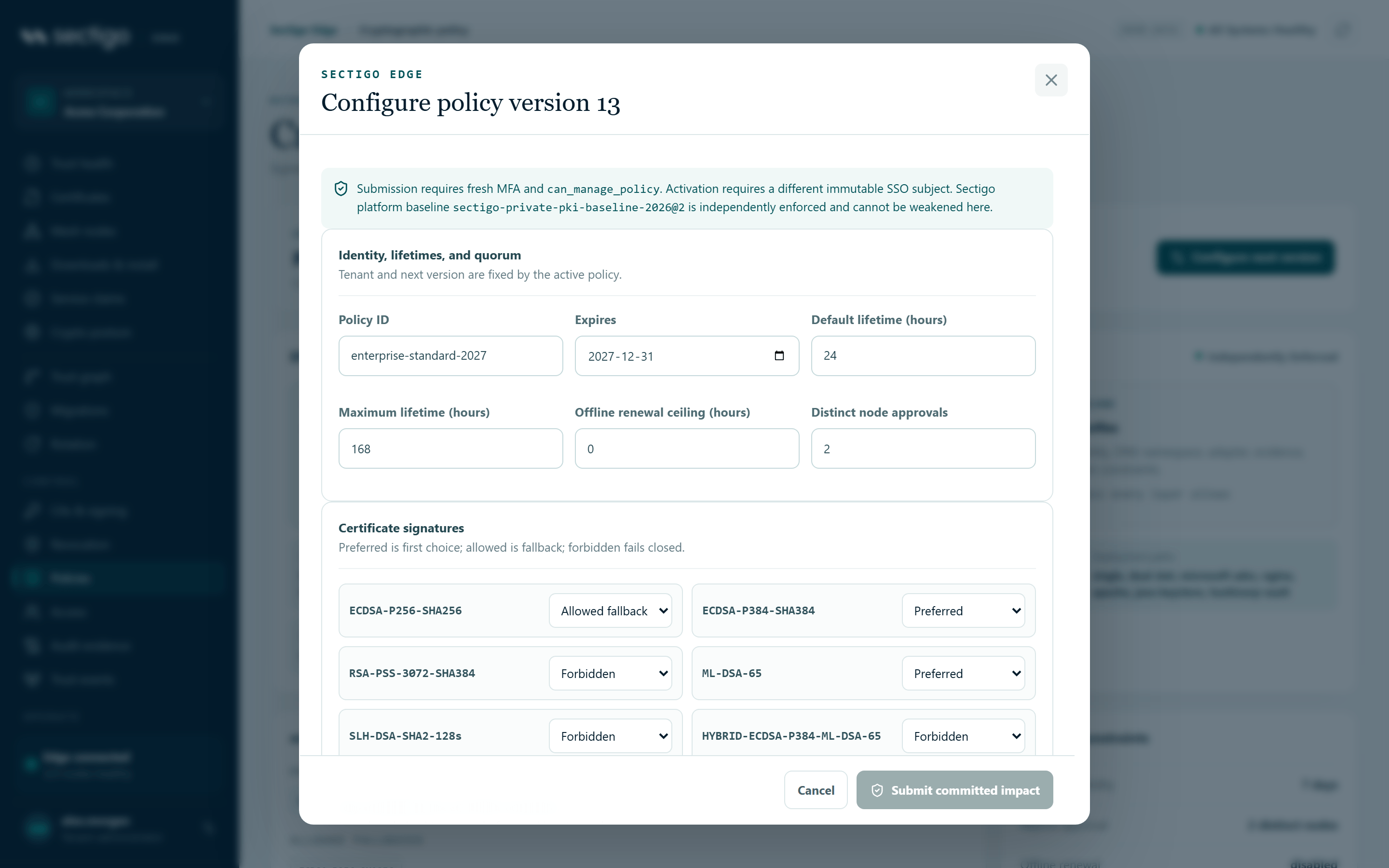
- Open ConsolePolicies and select Configure next version. The tenant and the next version number are fixed for you.
- Edit the sections you need:
- Identity, lifetimes, and quorum: default and maximum lifetime, offline renewal ceiling, and the number of distinct node approvals
- Certificate signatures: preferred, allowed fallback and forbidden algorithms
- Key establishment and PQC transition: Classical, Hybrid migration, PQC required, or PQC required after a date
- Issuance behavior guardrails: see Guardrails
- Workload and application profiles: including each profile's rotation settings and eligible approval nodes
- Select Assess managed estate. Sectigo Edge computes a server-side impact snapshot (see below).
- Review the assessment. If it reads Assessment is ready for independent review, tick I reviewed this exact assessment….
- Select Submit committed impact. You need fresh MFA and policy-management permission. The proposal enters the Policy review queue.
There is no instant revert. To go back, select Use as rollback base on an earlier version. This creates a new version with the old content, which goes through the same assessment and second approval.
Read the impact assessment
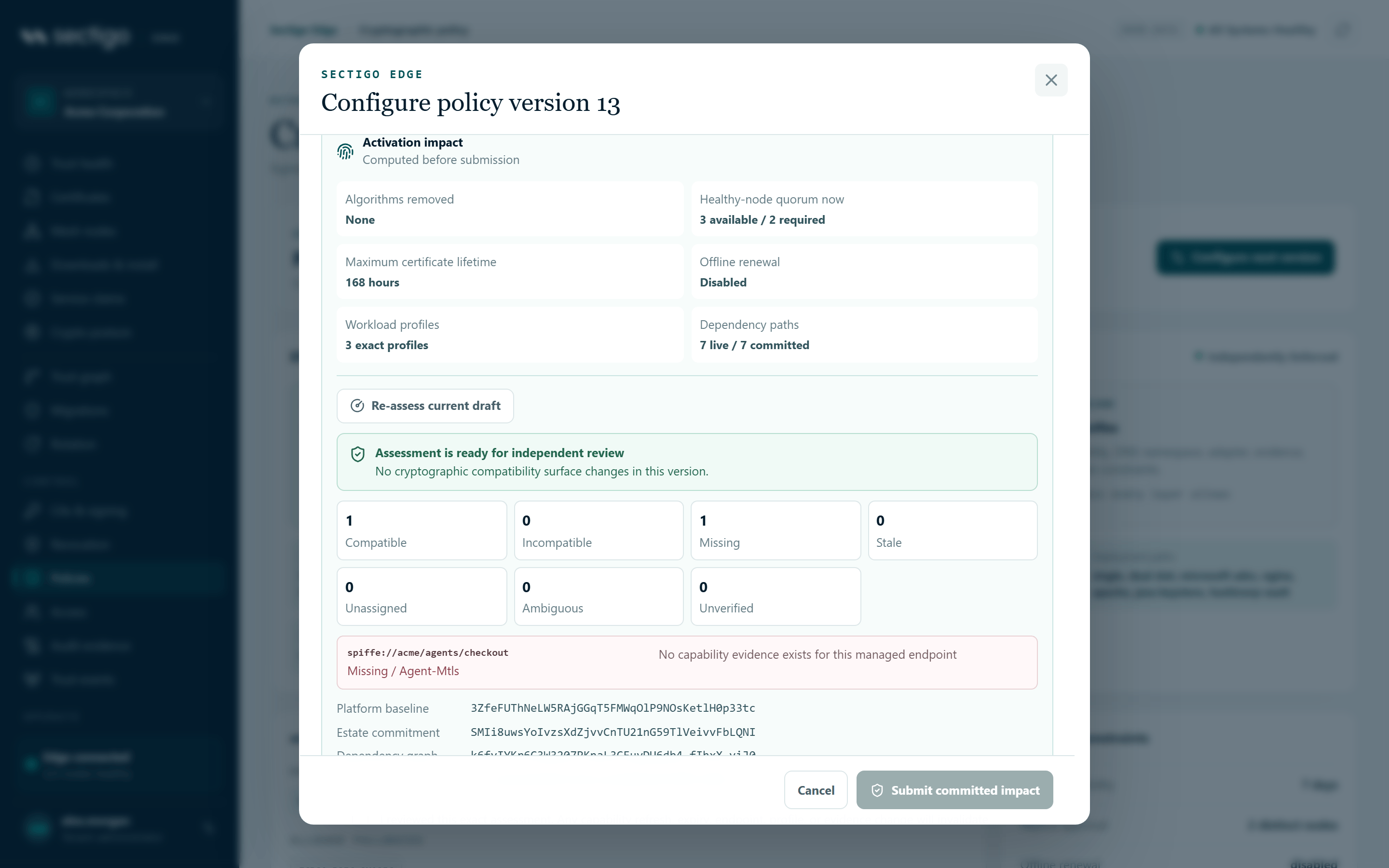
The assessment covers every endpoint Sectigo Edge manages: certificate sets, in-flight issuance requests and, where nodes report it, live dependency edges. Each endpoint is classified against the platform baseline, the proposed policy and its workload profile, using the newest capability evidence.
| Classification | Meaning | Fix |
|---|---|---|
compatible | Fresh machine or SDK evidence shows that the endpoint supports the effective policy. | — |
incompatible | No allowed signature or key-establishment option overlaps, or the hybrid/PQC requirement is not measured. | Upgrade the endpoint, or keep a fallback algorithm allowed. |
missing | The endpoint has no capability record. | Get capability evidence from its Mesh Node or SDK. |
stale | The newest evidence has expired. | Refresh the evidence. |
unassigned | No profile safely owns the endpoint. | Add or widen a profile. |
ambiguous | More than one profile owns the endpoint. | Narrow the profiles so that exactly one matches. |
unverified | The newest evidence was imported by an administrator, not machine-observed. | Replace it with machine-observed evidence. |
If the change touches signatures, key establishment, the transition mode or workload profiles, any endpoint that is not compatible blocks activation. This includes an empty inventory. The console then shows Cryptographic activation is blocked and Resolve compatibility blockers. You can still submit the proposal so that it can be reviewed as a remediation plan, but it cannot be activated. Changes outside that cryptographic surface still report coverage gaps, but those gaps do not block activation.
The assessment lists at most 500 endpoints for human review, with blockers first, and covers up to 25,000 endpoints. The Estate commitment digest covers every endpoint, including those not shown, so a change to a hidden endpoint still invalidates the approval. An estate larger than that limit fails with policy_impact_inventory_too_large. Sectigo Edge never samples the estate.
Approve and activate
- A different person opens the proposal in the Policy review queue. For the proposer, the button reads Different reviewer required.
- The reviewer checks the policy change and the assessment, then selects Approve & activate. Fresh MFA is required.
- Sectigo Edge recomputes the entire assessment. The policy is activated only if the result exactly matches the commitment you reviewed and is non-blocking. Activation is recorded as
policy.activated.
Mesh Nodes pick up the new signed policy version automatically. Subscribers to the trust-event feed receive policy.version.available.
Refresh a stale proposal
If anything changed between proposal and approval, such as a new endpoint, expired evidence, a new dependency edge, a different profile mapping or a new platform baseline, approval fails with policy_impact_changed and the queue shows Refresh impact required. Only the original proposer can select Refresh estate impact. This re-assesses the same policy bytes and records policy.impact_refreshed. It cannot change the policy content or the proposer.
Issuance guardrails
Guardrails automatically check each new certificate request against deterministic limits. Configure them under Issuance behavior guardrails in the policy editor. They follow the same approval workflow.
| Field | Policy key | Range |
|---|---|---|
| Response mode | mode | Enforce (block matching requests) or Monitor (issue and record a signed finding) |
| Requests per requester / 5 min | max_requests_per_requester_5m | 1–1,000 |
| Unique SANs per requester / 24 h | max_unique_sans_per_requester_24h | 1–10,000 |
| Maximum lifetime increase (%) | max_validity_increase_percent | 0–1,000 |
| History lookback (days) | history_lookback_days | 1–90 |
| Algorithm downgrade | block_algorithm_downgrade | Signal a request weaker than the latest issued generation |
In enforce mode, a matching request becomes a durable denied transaction and the CA is never called. Assessments, signals and blocked requests appear under ConsoleIncidents. No AI or external reputation score is involved. The decision is deterministic and is recorded in the issuance evidence.
Who approved what
Every step is written to the hash-chained audit log, with the actor's immutable identity:
| Audit event | Recorded when |
|---|---|
policy.proposed | A proposal is submitted. The event includes the impact digest. |
policy.impact_refreshed | The original proposer refreshes the assessment. |
policy.activated | A second person activates the version. |
To prove this to an auditor, export evidence as described in Audit & evidence export.
Errors you may see
| Code | Meaning | What to do |
|---|---|---|
step_up_required | Your MFA is older than ten minutes. | Sign in again, then retry. |
policy_separation_of_duties | The proposer tried to approve. | Ask a different administrator. |
policy_impact_changed | The estate or the platform baseline changed after review. | The original proposer refreshes the impact. |
policy_impact_blocked | The current assessment still has blockers. | Resolve the blockers, then refresh. |
policy_impact_required | A legacy proposal has no impact commitment. | The original proposer refreshes it. |
policy_proposer_mismatch | Someone other than the proposer tried to refresh. | Ask the original proposer. |
policy_quorum_node_unknown | The policy pins a quorum node that is not enrolled. | Enrol the node, or remove it from the pinned set. |
invalid_policy_version | You can assess impact only for the next version. | Reload, then start from the current active version. |
policy_version_reused | That version number is already bound to a different proposal. | Reload and start again. |
Related
- Policies console reference
- Cryptographic migrations: plans inherit the approved policy-impact digest
- Access and roles